
Pools in Tonhub
The following staking pools are available in Tonhub:- Nominators - First proprietary pool with 25% commission. Open access for all users.
- Club - Private pool for NFT whales holders. 18% commission.
- Tonkeeper - Partnership pool with Tonkeeper non-custodial wallet. Open access, 25% commission.
- Whales Liquid - Liquid pool that issues wsTON tokens instead of locking funds. The wsTON rate grows proportionally to staking yield.
- USDe liquid - Third-party liquid pool for staking USDe (Ethena) token.
- Team - Private pool for Whales team and top-15 NFT club participants. 5% commission.
Requirements before starting
- The minimum amount for sending funds is 50 TON for all pools, except for the liquid pool, for which the minimum amount is 1 TON.
- Tonhub wallet must be installed on your mobile device.
- It is necessary to ensure in advance that you have funds to pay the withdrawal fee. The total gas cost for a withdrawal operation can reach 0.4 TON — it is recommended to reserve this amount on your wallet balance.
- A withdrawal request can only be made from the wallet address from which the stake was sent. In case of loss of access to the wallet, fund recovery will be impossible.
- Sending funds from custodial wallets or cryptocurrency exchanges is strictly prohibited. Violation of this requirement will result in irreversible loss of funds.
Yield Calculator
The yield calculator allows you to calculate the profit you will receive from staking over different periods. To access the calculator, click the Calculate button on any pool screen.Enter the amount you plan to send to staking in the selected pool, and the calculator will display annual, monthly, and daily returns taking into account the pool commission.
.jpg?fit=max&auto=format&n=24hSgM-qkRocSbUd&q=85&s=384f9df4b6ad16c958300b4ebd6cd12b "2025 12 3011 42 56(1)")
Please note: the overall staking yield may vary depending on the blockchain state. The calculated value is theoretical and reflects yield based on current staking metrics. You can check current staking yield metrics on the calculator page of the Ton Whales website.
When rewards are credited
Rewards are credited to your staking balance upon completion of each full cycle in which your funds participated.Example of accrual timing calculation:
If you send funds to staking on the 1st, and the current staking cycle ends on the 2nd at 6:00 PM, then:
- Your funds will be accepted by the pool and begin participating in staking from the 2nd at 6:00 PM
- The first profit accrual will occur at the end of the next full cycle — on the 4th at 6:00 AM (36 hours after starting participation in staking)
Deposit via Tonhub
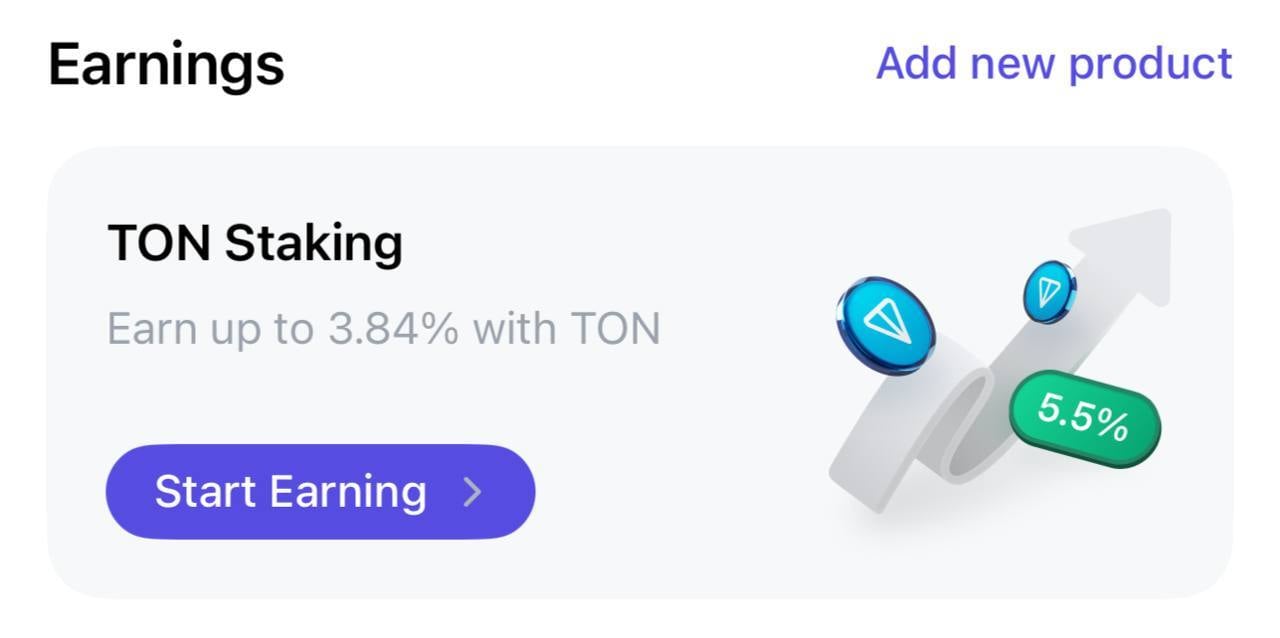
- Tap the staking banner on the main screen
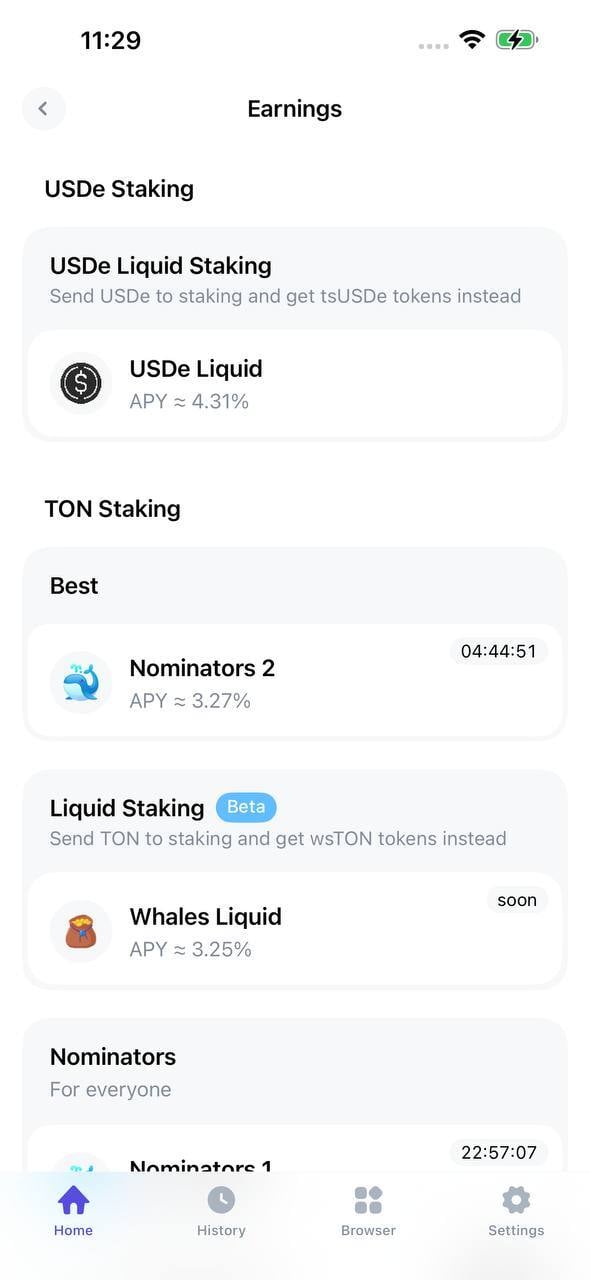
- Select the pool you want to send funds to and click on it. Each pool displays the commission it charges. Note that the Club and Team pools are private, and to send coins to them you must meet the following conditions:
- Club — на вашем кошельке должен находиться один из NFT из коллекции Whales Club.
- Team — you must be a member of the whales team or be in the top-15 holders of NFTs from the Whales Club collection, and your wallet must be included in the list (a wallet can be added to the list by an IAM team member).
- On the main pool page, click the “Top Up” button.
.jpg?fit=max&auto=format&n=24hSgM-qkRocSbUd&q=85&s=6f2b7dc92abb21906fa5d85a5b645f23 "2025 12 3011 30 35(1)")
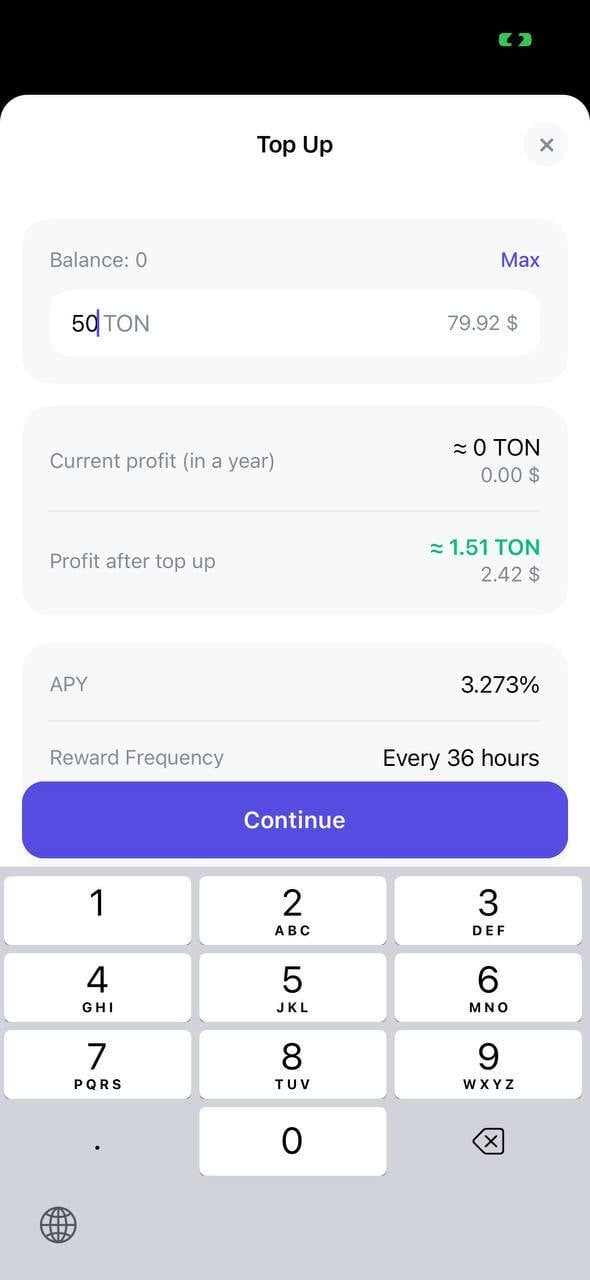
- Specify the amount you want to send to staking and click “Continue”. For the liquid pool, the minimum amount is 1 TON, for all other pools — 50 TON. The pool will automatically calculate the annual yield based on the current staking returns.
- Confirm the transaction. Note that you will need to pay gas (commission) for sending coins to staking in the amount of 0.2 TON. The remaining commission will be returned after sending. The pool will automatically leave 0.2 TON on your balance, which you can use to make withdrawals.
- Your coins will be displayed with a Pending deposit status and will start participating in staking after the end of the current cycle. Rewards will be credited to your staking balance at the end of each full cycle. Thus, the first reward will appear on your staking balance after the time remaining until the end of the current cycle, plus one full cycle (36 hours).
.jpg?fit=max&auto=format&n=24hSgM-qkRocSbUd&q=85&s=d7840089321b713a59a0bc90549b134a "2025 12 3012 09 07(1)")
Withdrawal from staking via Tonhub
- On the main Tonhub screen, tap the pool from which you want to withdraw funds in the Earnings section.
- On the main pool page, tap the Withdraw button.
- Specify the amount to withdraw from staking and tap “Continue”.
- Confirm the withdrawal operation. The system will create a request to withdraw coins from staking. Please note that the operation incurs a fee of 0.2 TON. The unused portion of the fee will be returned after the request is processed.
- Coins requested for withdrawal will be displayed on the pool page with the status “Pending withdraw” and will remain in this state until the current staking cycle is completed.
- At the end of the cycle, the coins will receive the status “Ready for withdraw”, which means they are ready to be withdrawn from the pool balance. Click on the corresponding card and confirm the withdrawal operation. Funds will arrive in your balance within a few minutes. This operation also charges a fee of 0.2 TON, with the unused portion being returned after the request is processed.
-1.jpg?fit=max&auto=format&n=24hSgM-qkRocSbUd&q=85&s=8afc3e83a58e963dec3e338d3c56154d "2025 12 3012 09 07(1) 1")