
Architecture
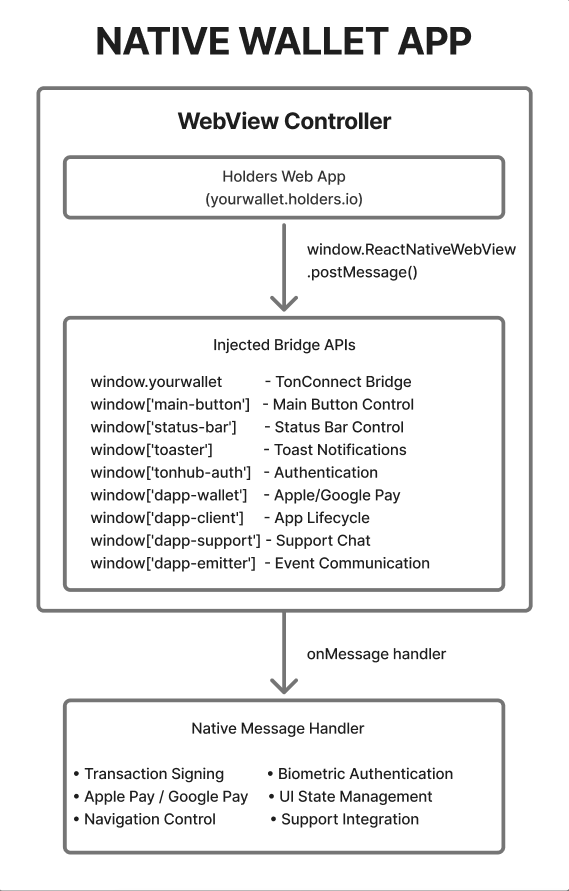
How It Works
- Pre-content injection: JavaScript code is injected into WebView before the page loads via
injectedJavaScriptBeforeContentLoaded - Bidirectional communication: The web app sends messages via
window.ReactNativeWebView.postMessage(), and the native app responds viawebView.injectJavaScript() - Promise-based API: Most methods return Promises and use callbacks to receive results
API Priorities
| API | Priority | Necessity |
|---|---|---|
| TonConnect Bridge | 🔴 Critical | Connection and transactions |
| Main Button API | 🔴 High | Action button |
| DApp Client API | 🔴 High | Closing and navigation (minimum closeApp, openUrl) |
| Auth API | 🔴 High | Operation security |
| Status Bar API | 🟡 Medium | Safe area insets |
| Toaster API | 🟡 Medium | User notifications |
| Wallet API | 🟡 Medium | Only for Apple/Google Pay cards |
| Emitter API | 🟡 Medium | State synchronization |
| Support API | 🟢 Low | Intercom (Optional) |
Communication Mechanism
Message Format from WebView to Native
interface WebViewMessage {
  id?: number;                    // Request ID for callback
  data: {
    name: string;                 // Method name (e.g., 'main-button.show')
    args?: Record<string, any>;   // Method arguments
  };
}
Response Format from Native to WebView
interface NativeResponse {
  id?: number;                    // Original request ID
  data: any;                      // Response data
  type?: 'functionResponse';      // Message type
  status?: 'fulfilled' | 'rejected';
}
Basic Injection Pattern
// Inject API into window object
const injectedJS = `
  window['api-name'] = (() => {
    let __API_AVAILABLE = true;

    const methodName = (args) => {
      window.ReactNativeWebView.postMessage(JSON.stringify({
        data: { name: 'api-name.methodName', args }
      }));
    };

    const obj = { methodName, __API_AVAILABLE };
    Object.freeze(obj);
    return obj;
  })();
`;
TonConnect Bridge
Window Object:window.tonhubPurpose: Implementation of TonConnect v2 protocol for wallet connection and transaction signing.
Priority: Critical (required for operation)
TypeScript Interface
interface TonConnectInjectedBridge {
  // Device information
  deviceInfo: DeviceInfo;

  // Protocol version (2)
  protocolVersion: number;

  // Flag indicating this is an embedded wallet browser
  isWalletBrowser: boolean;

  // Connect new application
  connect(
    protocolVersion: number,
    request: ConnectRequest
  ): Promise<ConnectEvent>;

  // Restore existing connection
  restoreConnection(): Promise<ConnectEvent>;

  // Disconnect
  disconnect(): Promise<void>;

  // Send requests (transactions, data signing) - TON
  send<T extends RpcMethod>(request: AppRequest<T>): Promise<WalletResponse<T>>;

  // ─────────────────────────────────────────────────────────────
  // Solana Support (extension for multi-chain wallets)
  // ─────────────────────────────────────────────────────────────

  // Send legacy Solana transaction
  sendSolanaTransaction(transaction: string): Promise<WalletResponse<string>>;

  // Send versioned Solana transaction (v0)
  sendSolanaVersionedTransaction(transaction: string): Promise<WalletResponse<string>>;
}

interface DeviceInfo {
  platform: 'iphone' | 'ipad' | 'android' | 'windows' | 'mac' | 'linux' | 'browser';
  appName: string;
  appVersion: string;
  maxProtocolVersion: number;
  features: TonConnectFeature[];
}

interface ConnectRequest {
  manifestUrl: string;
  items: ConnectItem[];
}

interface ConnectEvent {
  event: 'connect' | 'connect_error';
  id: number;
  payload: ConnectEventPayload;
}

// Response for Solana transactions
interface SolanaTransactionResponse {
  result?: string;  // Transaction signature (base58)
  error?: {
    code: number;
    message: string;
  };
  id: string;
}
Injection Implementation
const tonConnectBridge = `
(() => {
  if (!window.tonhub) {
    window.rnPromises = {};
    window.rnEventListeners = [];

    window.invokeRnFunc = (name, args, resolve, reject) => {
      const invocationId = btoa(Math.random()).substring(0, 12);
      window.rnPromises[invocationId] = { resolve, reject };
      window.ReactNativeWebView.postMessage(JSON.stringify({
        type: 'invokeRnFunc',
        invocationId,
        name,
        args,
      }));
    };

    window.addEventListener('message', ({ data }) => {
      try {
        const message = JSON.parse(data);
        if (message.type === 'functionResponse') {
          const promise = window.rnPromises[message.invocationId];
          if (promise) {
            if (message.status === 'fulfilled') {
              promise.resolve(message.data);
            } else {
              promise.reject(new Error(message.data));
            }
            delete window.rnPromises[message.invocationId];
          }
        }
        if (message.type === 'event') {
          window.rnEventListeners.forEach((listener) => listener(message.event));
        }
      } catch {}
    });
  }

  window.tonhub = {
    deviceInfo: {
      platform: 'iphone', // or 'android'
      appName: 'YourWallet',
      appVersion: '1.0.0',
      maxProtocolVersion: 2,
      features: [
        'SendTransaction',
        { name: 'SendTransaction', maxMessages: 4 },
        { name: 'SignData' }
      ]
    },
    protocolVersion: 2,
    isWalletBrowser: true,

    connect: (...args) => new Promise((resolve, reject) =>
      window.invokeRnFunc('connect', args, resolve, reject)
    ),

    restoreConnection: (...args) => new Promise((resolve, reject) =>
      window.invokeRnFunc('restoreConnection', args, resolve, reject)
    ),

    disconnect: (...args) => new Promise((resolve, reject) =>
      window.invokeRnFunc('disconnect', args, resolve, reject)
    ),

    send: (...args) => new Promise((resolve, reject) =>
      window.invokeRnFunc('send', args, resolve, reject)
    ),

    // Solana methods
    sendSolanaTransaction: (...args) => new Promise((resolve, reject) =>
      window.invokeRnFunc('sendSolanaTransaction', args, resolve, reject)
    ),

    sendSolanaVersionedTransaction: (...args) => new Promise((resolve, reject) =>
      window.invokeRnFunc('sendSolanaVersionedTransaction', args, resolve, reject)
    ),
  };

  Object.freeze(window.tonhub);
})();
`;
Native-Side Handling
// Message handler from WebView
const handleBridgeMessage = async (message: WebViewBridgeMessage) => {
  if (message.type === 'invokeRnFunc') {
    const { name, args, invocationId } = message;

    try {
      let result;

      switch (name) {
        case 'connect':
          result = await handleConnect(args[0], args[1]);
          break;
        case 'restoreConnection':
          result = await handleRestoreConnection();
          break;
        case 'disconnect':
          result = await handleDisconnect();
          break;
        case 'send':
          result = await handleSendRequest(args[0]);
          break;
        // Solana methods
        case 'sendSolanaTransaction':
          result = await handleSolanaTransaction(args[0], 'message');
          break;
        case 'sendSolanaVersionedTransaction':
          result = await handleSolanaTransaction(args[0], 'versioned-transaction');
          break;
      }

      // Send success response
      webView.injectJavaScript(`
        window.postMessage(JSON.stringify({
          type: 'functionResponse',
          invocationId: '${invocationId}',
          status: 'fulfilled',
          data: ${JSON.stringify(result)}
        }), '*');
      `);
    } catch (error) {
      // Send error response
      webView.injectJavaScript(`
        window.postMessage(JSON.stringify({
          type: 'functionResponse',
          invocationId: '${invocationId}',
          status: 'rejected',
          data: '${error.message}'
        }), '*');
      `);
    }
  }
};

// Example of sendTransaction handling (TON)
async function handleSendRequest(request: AppRequest) {
  if (request.method === 'sendTransaction') {
    const params = JSON.parse(request.params[0]);

    // Show transaction confirmation screen to user
    const confirmed = await showTransactionConfirmation(params);

    if (confirmed) {
      const boc = await signAndSendTransaction(params);
      return { result: boc, id: request.id };
    } else {
      return {
        error: { code: 300, message: 'User rejected' },
        id: request.id
      };
    }
  }
}
// Message handler from WebView
const handleBridgeMessage = async (message: WebViewBridgeMessage) => {
  if (message.type === 'invokeRnFunc') {
    const { name, args, invocationId } = message;

    try {
      let result;

      switch (name) {
        case 'connect':
          result = await handleConnect(args[0], args[1]);
          break;
        case 'restoreConnection':
          result = await handleRestoreConnection();
          break;
        case 'disconnect':
          result = await handleDisconnect();
          break;
        case 'send':
          result = await handleSendRequest(args[0]);
          break;
        // Solana methods
        case 'sendSolanaTransaction':
          result = await handleSolanaTransaction(args[0], 'message');
          break;
        case 'sendSolanaVersionedTransaction':
          result = await handleSolanaTransaction(args[0], 'versioned-transaction');
          break;
      }

      // Send success response
      webView.injectJavaScript(`
        window.postMessage(JSON.stringify({
          type: 'functionResponse',
          invocationId: '${invocationId}',
          status: 'fulfilled',
          data: ${JSON.stringify(result)}
        }), '*');
      `);
    } catch (error) {
      // Send error response
      webView.injectJavaScript(`
        window.postMessage(JSON.stringify({
          type: 'functionResponse',
          invocationId: '${invocationId}',
          status: 'rejected',
          data: '${error.message}'
        }), '*');
      `);
    }
  }
};

// Example of sendTransaction handling (TON)
async function handleSendRequest(request: AppRequest) {
  if (request.method === 'sendTransaction') {
    const params = JSON.parse(request.params[0]);

    // Show transaction confirmation screen to user
    const confirmed = await showTransactionConfirmation(params);

    if (confirmed) {
      const boc = await signAndSendTransaction(params);
      return { result: boc, id: request.id };
    } else {
      return {
        error: { code: 300, message: 'User rejected' },
        id: request.id
      };
    }
  }
}
Solana Transaction Methods
Two additional methods are added for Solana wallet support in Holders.sendSolanaTransaction
Sends a legacy (pre-v0) Solana transaction. The transaction is passed as a base64-encoded serialized message.
// Call from WebView
const signature = await window.tonhub.sendSolanaTransaction(base64Transaction);

// Transaction format
// transaction: base64-encoded serialized Solana Message
transaction(string) — Base64-encoded serialized Solana message (legacy format)
result(string) — Base58-encoded transaction signature on successerror— Error object on rejection or failure
sendSolanaVersionedTransaction
Sends a versioned (v0) Solana transaction. Used for transactions with Address Lookup Tables.
// Call from WebView
const signature = await window.tonhub.sendSolanaVersionedTransaction(base64Transaction);

// Transaction format
// transaction: base64-encoded serialized VersionedTransaction
transaction(string) — Base64-encoded serialized VersionedTransaction
result(string) — Base58-encoded transaction signature on successerror— Error object on rejection or failure
Native-Side Implementation of Solana Methods
// Add Solana methods to the bridgeObject

const bridgeObject = {
  // ... TonConnect methods ...

  sendSolanaTransaction: async (transaction: string): Promise<WalletResponse<string>> => {
    return new Promise((resolve) => {
      const callback = (ok: boolean, signature: string | null) => {
        if (!ok) {
          resolve({
            error: {
              code: 300, // USER_REJECTS_ERROR
              message: 'User rejected',
            },
            id: requestId.toString(),
          });
          return;
        }

        resolve({
          result: signature,
          id: requestId.toString(),
        });
      };

      // Navigate to Solana transaction confirmation screen
      navigation.navigateSolanaTransfer({
        type: 'message',        // Legacy message format
        message: transaction,   // Base64-encoded message
        callback
      });
    });
  },

  sendSolanaVersionedTransaction: async (transaction: string): Promise<WalletResponse<string>> => {
    return new Promise((resolve) => {
      const callback = (ok: boolean, signature: string | null) => {
        if (!ok) {
          resolve({
            error: {
              code: 300, // USER_REJECTS_ERROR
              message: 'User rejected',
            },
            id: requestId.toString(),
          });
          return;
        }

        resolve({
          result: signature,
          id: requestId.toString(),
        });
      };

      // Navigate to Solana transaction confirmation screen
      navigation.navigateSolanaTransfer({
        type: 'versioned-transaction',  // Versioned transaction format
        transaction: transaction,        // Base64-encoded VersionedTransaction
        callback
      });
    });
  }
};
Solana Transaction Processing
// Example Solana transaction confirmation screen

interface SolanaTransferParams {
  type: 'message' | 'versioned-transaction';
  message?: string;      // For legacy transactions
  transaction?: string;  // For versioned transactions
  callback: (ok: boolean, signature: string | null) => void;
}

async function handleSolanaTransfer(params: SolanaTransferParams) {
  try {
    let transaction;

    if (params.type === 'message') {
      // Deserialize legacy message
      const messageBytes = Buffer.from(params.message, 'base64');
      const message = Message.from(messageBytes);
      transaction = Transaction.populate(message);
    } else {
      // Deserialize versioned transaction
      const txBytes = Buffer.from(params.transaction, 'base64');
      transaction = VersionedTransaction.deserialize(txBytes);
    }

    // Show transaction details to user
    const confirmed = await showSolanaConfirmationUI(transaction);

    if (!confirmed) {
      params.callback(false, null);
      return;
    }

    // Sign and send
    const signature = await signAndSendSolanaTransaction(transaction);

    // Return signature
    params.callback(true, signature);

  } catch (error) {
    console.error('Solana transaction error:', error);
    params.callback(false, null);
  }
}
WebView Usage Example
Javascript
// Send legacy Solana transaction
async function sendLegacySolanaTransaction() {
  try {
    // Create transaction
    const transaction = new Transaction().add(
      SystemProgram.transfer({
        fromPubkey: walletPublicKey,
        toPubkey: recipientPublicKey,
        lamports: 1000000, // 0.001 SOL
      })
    );

    // Serialize message
    const message = transaction.compileMessage();
    const base64Message = Buffer.from(message.serialize()).toString('base64');

    // Send via bridge
    const response = await window.tonhub.sendSolanaTransaction(base64Message);

    if (response.error) {
      console.error('Transaction failed:', response.error.message);
      return;
    }

    console.log('Transaction signature:', response.result);

  } catch (error) {
    console.error('Error:', error);
  }
}

// Send versioned Solana transaction
async function sendVersionedSolanaTransaction() {
  try {
    // Create versioned transaction with Address Lookup Table
    const instructions = [/* ... */];
    const addressLookupTableAccounts = [/* ... */];

    const messageV0 = new TransactionMessage({
      payerKey: walletPublicKey,
      recentBlockhash: blockhash,
      instructions,
    }).compileToV0Message(addressLookupTableAccounts);

    const versionedTransaction = new VersionedTransaction(messageV0);

    // Serialize
    const serialized = versionedTransaction.serialize();
    const base64Transaction = Buffer.from(serialized).toString('base64');

    // Send via bridge
    const response = await window.tonhub.sendSolanaVersionedTransaction(base64Transaction);

    if (response.error) {
      console.error('Transaction failed:', response.error.message);
      return;
    }

    console.log('Transaction signature:', response.result);

  } catch (error) {
    console.error('Error:', error);
  }
}
Main Button API
Window Object:window['main-button']Purpose: Control native action button displayed over the WebView (similar to Telegram Mini Apps).
Priority: High
TypeScript Interface
interface MainButtonAPI {
  __MAIN_BUTTON_AVAILIBLE: boolean;

  // Set button text
  setText(text: string): void;

  // Subscribe to click
  onClick(callback: () => void): void;

  // Unsubscribe from click
  offClick(callback: () => void): void;

  // Show loading indicator
  showProgress(leaveActive?: boolean): void;

  // Hide loading indicator
  hideProgress(): void;

  // Show button
  show(): void;

  // Hide button
  hide(): void;

  // Enable button
  enable(): void;

  // Disable button
  disable(): void;

  // Set button parameters
  setParams(params: MainButtonParams): void;
}

interface MainButtonParams {
  text?: string;
  color?: string;
  textColor?: string;
  isActive?: boolean;
  isVisible?: boolean;
}
Injection Implementation
Typescript
const mainButtonAPI = `
window['main-button'] = (() => {
  let requestId = 0;
  let callbacks = {};
  let __MAIN_BUTTON_AVAILIBLE = true;

  const setText = (text) => {
    window.ReactNativeWebView.postMessage(JSON.stringify({
      data: { name: 'main-button.setText', args: { text } }
    }));
  };

  const onClick = (callback) => {
    let id = requestId++;
    callback.uniqueId = id;
    window.ReactNativeWebView.postMessage(JSON.stringify({
      id,
      data: { name: 'main-button.onClick' }
    }));
    callbacks[id] = callback;
  };

  const offClick = (callback) => {
    let id = callback.uniqueId;
    if (!id) {
      id = requestId;
    }
    window.ReactNativeWebView.postMessage(JSON.stringify({
      id,
      data: { name: 'main-button.offClick' }
    }));
    delete callbacks[id];
  };

  const showProgress = (leaveActive) => {
    window.ReactNativeWebView.postMessage(JSON.stringify({
      data: { name: 'main-button.showProgress', args: { leaveActive } }
    }));
  };

  const hideProgress = () => {
    window.ReactNativeWebView.postMessage(JSON.stringify({
      data: { name: 'main-button.hideProgress' }
    }));
  };

  const show = () => {
    window.ReactNativeWebView.postMessage(JSON.stringify({
      data: { name: 'main-button.show' }
    }));
  };

  const hide = () => {
    window.ReactNativeWebView.postMessage(JSON.stringify({
      data: { name: 'main-button.hide' }
    }));
  };

  const enable = () => {
    window.ReactNativeWebView.postMessage(JSON.stringify({
      data: { name: 'main-button.enable' }
    }));
  };

  const disable = () => {
    window.ReactNativeWebView.postMessage(JSON.stringify({
      data: { name: 'main-button.disable' }
    }));
  };

  const setParams = (params) => {
    window.ReactNativeWebView.postMessage(JSON.stringify({
      data: { name: 'main-button.setParams', args: params }
    }));
  };

  // Called by native code on click
  const __response = (ev) => {
    if (ev && callbacks[ev.id] && ev.data) {
      let c = callbacks[ev.id];
      c(ev.data);
      return;
    }

    const lastId = Object.keys(callbacks).pop();
    if (lastId && callbacks[lastId]) {
      let c = callbacks[lastId];
      c();
    }
  };

  const obj = {
    setText, onClick, offClick, showProgress, hideProgress,
    show, hide, enable, disable, setParams,
    __MAIN_BUTTON_AVAILIBLE, __response
  };
  Object.freeze(obj);
  return obj;
})();
`;
Native-Side Handling
Typescript
// Button state
interface MainButtonState {
  text: string;
  textColor: string;
  color: string;
  isVisible: boolean;
  isActive: boolean;
  isProgressVisible: boolean;
  onPress?: () => void;
}

// Reducer for button state
function processMainButtonMessage(parsed: any, dispatch: Function, webRef: RefObject<WebView>) {
  const method = parsed.data.name;
  const args = parsed.data.args;

  switch (method) {
    case 'main-button.setText':
      dispatch({ type: 'setText', text: args.text });
      break;
    case 'main-button.show':
      dispatch({ type: 'show' });
      break;
    case 'main-button.hide':
      dispatch({ type: 'hide' });
      break;
    case 'main-button.enable':
      dispatch({ type: 'enable' });
      break;
    case 'main-button.disable':
      dispatch({ type: 'disable' });
      break;
    case 'main-button.showProgress':
      dispatch({ type: 'showProgress', leaveActive: args?.leaveActive });
      break;
    case 'main-button.hideProgress':
      dispatch({ type: 'hideProgress' });
      break;
    case 'main-button.onClick':
      dispatch({
        type: 'setOnPress',
        onPress: () => {
          // Trigger callback in WebView
          webRef.current?.injectJavaScript(
            `window['main-button'].__response(); true;`
          );
        }
      });
      break;
    case 'main-button.setParams':
      dispatch({ type: 'setParams', params: args });
      break;
  }
}
Status Bar API
Window Object:window['status-bar']Purpose: Control status bar style and provide device safe area insets.
**Priority: **Medium
TypeScript Interface
interface StatusBarAPI {
  __STATUS_BAR_AVAILIBLE: boolean;

  // Safe area insets for device notches
  safeArea: {
    top: number;
    bottom: number;
    left: number;
    right: number;
  };

  statusBar: {
    // Set status bar style
    setStatusBarStyle(style: 'light' | 'dark'): void;

    // Set status bar background color
    setStatusBarBackgroundColor(color: string): void;
  };
}
Injection Implementation
Typescript
const statusBarAPI = (safeArea: EdgeInsets) => {
  return `
  window['status-bar'] = (() => {
    let __STATUS_BAR_AVAILIBLE = true;
    const safeArea = ${JSON.stringify(safeArea)};

    const setStatusBarStyle = (style) => {
      window.ReactNativeWebView.postMessage(JSON.stringify({
        data: { name: 'status-bar.setStatusBarStyle', args: [style] }
      }));
    };

    const setStatusBarBackgroundColor = (backgroundColor) => {
      window.ReactNativeWebView.postMessage(JSON.stringify({
        data: { name: 'status-bar.setStatusBarBackgroundColor', args: [backgroundColor] }
      }));
    };

    const statusBar = { setStatusBarStyle, setStatusBarBackgroundColor };

    Object.freeze(statusBar);
    Object.freeze(safeArea);

    const obj = { __STATUS_BAR_AVAILIBLE, statusBar, safeArea };
    Object.freeze(obj);
    return obj;
  })();
  `;
};
Native-Side Handling
Typescript
import { setStatusBarStyle, setStatusBarBackgroundColor } from 'expo-status-bar';

function processStatusBarMessage(parsed: any) {
  const method = parsed.data.name;
  const args = parsed.data.args;

  switch (method) {
    case 'status-bar.setStatusBarStyle':
      // args[0] = 'light' | 'dark'
      setStatusBarStyle(args[0]);
      break;
    case 'status-bar.setStatusBarBackgroundColor':
      // args[0] = color string (e.g., '#000000')
      setStatusBarBackgroundColor(args[0]);
      break;
  }
}
Toaster API
**Window Object: **window['toaster']Purpose: Display native toast notifications over the WebView.
Priority: Medium
TypeScript Interface
interface ToasterAPI {
  __TOASTER_AVAILIBLE: boolean;

  // Show toast
  show(props: ToastProps): void;

  // Clear all toasts
  clear(): void;

  // Add to queue
  push(props: ToastProps): void;

  // Remove last from queue
  pop(): void;
}

interface ToastProps {
  message: string;
  type?: 'success' | 'error' | 'warning' | 'info';
  duration?: number;
  onPress?: () => void;
}
Injection Implementation
Typescript
const toasterAPI = `
window['toaster'] = (() => {
  let __TOASTER_AVAILIBLE = true;

  const show = (props) => {
    window.ReactNativeWebView.postMessage(JSON.stringify({
      data: { name: 'toaster.show', args: props }
    }));
  };

  const clear = () => {
    window.ReactNativeWebView.postMessage(JSON.stringify({
      data: { name: 'toaster.clear' }
    }));
  };

  const push = (props) => {
    window.ReactNativeWebView.postMessage(JSON.stringify({
      data: { name: 'toaster.push', args: props }
    }));
  };

  const pop = () => {
    window.ReactNativeWebView.postMessage(JSON.stringify({
      data: { name: 'toaster.pop' }
    }));
  };

  const obj = { show, clear, push, pop, __TOASTER_AVAILIBLE };
  Object.freeze(obj);
  return obj;
})();
`;
Native-Side Handling
Typescript
function processToasterMessage(parsed: any, toaster: ToasterClient) {
  const method = parsed.data.name;
  const args = parsed.data.args;

  switch (method) {
    case 'toaster.show':
      toaster.show(args);
      break;
    case 'toaster.clear':
      toaster.clear();
      break;
    case 'toaster.push':
      toaster.push(args);
      break;
    case 'toaster.pop':
      toaster.pop();
      break;
  }
}
Auth API
Window Object:window['tonhub-auth']**Purpose: **Request biometric user authentication and manage app protection state.
Priority: High (for critical operations)
TypeScript Interface
interface AuthAPI {
  __AUTH_AVAILIBLE: boolean;

  // Initial parameters
  params: {
    lastAuthTime?: number;    // Last authentication timestamp
    isSecured: boolean;       // Whether app protection is enabled
  };

  // Get last authentication time
  getLastAuthTime(callback: (time: number) => void): void;

  // Request authentication (biometrics/passcode)
  authenticate(callback: (result: AuthResult) => void): void;

  // Prompt to enable app protection
  lockAppWithAuth(callback: (result: LockResult) => void): void;
}

interface AuthResult {
  isAuthenticated: boolean;
  lastAuthTime?: number;
  error?: string;
}

interface LockResult {
  isSecured: boolean;
  lastAuthTime?: number;
  error?: string;
}
Injection Implementation
Typescript
const authAPI = (params: { lastAuthTime?: number, isSecured: boolean }) => {
  return `
  window['tonhub-auth'] = (() => {
    let __AUTH_AVAILIBLE = true;
    let inProgress = false;
    let currentCallback = null;
    const params = ${JSON.stringify(params)};

    const getLastAuthTime = (callback) => {
      if (inProgress) {
        callback({ error: 'auth.inProgress' });
        return;
      }
      currentCallback = callback;
      window.ReactNativeWebView.postMessage(JSON.stringify({
        data: { name: 'auth.getLastAuthTime' }
      }));
    };

    const authenticate = (callback) => {
      if (inProgress) {
        callback({ isAuthenticated: false, error: 'auth.inProgress' });
        return;
      }

      inProgress = true;
      currentCallback = callback;
      window.ReactNativeWebView.postMessage(JSON.stringify({
        data: { name: 'auth.authenticate' }
      }));
    };

    const lockAppWithAuth = (callback) => {
      if (inProgress) {
        callback({ isAuthenticated: false, error: 'auth.inProgress' });
        return;
      }

      inProgress = true;
      currentCallback = callback;
      window.ReactNativeWebView.postMessage(JSON.stringify({
        data: { name: 'auth.lockAppWithAuth' }
      }));
    };

    const __response = (ev) => {
      inProgress = false;
      if (!ev || !ev.data) {
        if (currentCallback) {
          currentCallback({ error: 'auth.noResponse' });
        }
        currentCallback = null;
        return;
      }
      if (currentCallback) {
        if (typeof ev.data === 'number') {
          params.lastAuthTime = ev.data;
          currentCallback(ev.data);
        } else {
          if (ev.data.lastAuthTime) {
            params.lastAuthTime = ev.data.lastAuthTime;
          }
          if (typeof ev.data.isSecured === 'boolean') {
            params.isSecured = true;
            currentCallback({ isSecured: ev.data.isSecured, lastAuthTime: ev.data.lastAuthTime });
          } else if (typeof ev.data.isAuthenticated === 'boolean') {
            currentCallback({ isAuthenticated: ev.data.isAuthenticated, lastAuthTime: ev.data.lastAuthTime });
          }
        }
        currentCallback = null;
      }
    };

    const obj = { __AUTH_AVAILIBLE, params, authenticate, getLastAuthTime, lockAppWithAuth, __response };
    Object.freeze(obj);
    return obj;
  })();
  `;
};
Native-Side Handling
Typescript
async function handleAuthMessage(method: string, webRef: RefObject<WebView>, authContext: AuthContext) {
  switch (method) {
    case 'auth.getLastAuthTime':
      const lastAuthTime = getLastAuthTimestamp() || 0;
      webRef.current?.injectJavaScript(
        `window['tonhub-auth'].__response({ data: ${lastAuthTime} }); true;`
      );
      break;

    case 'auth.authenticate':
      try {
        // Check if authentication is needed
        if (isAuthTimedOut()) {
          await authContext.authenticate({ cancelable: true });
        }
        const timestamp = getLastAuthTimestamp();
        webRef.current?.injectJavaScript(
          `window['tonhub-auth'].__response(${JSON.stringify({
            data: { isAuthenticated: true, lastAuthTime: timestamp }
          })}); true;`
        );
      } catch {
        webRef.current?.injectJavaScript(
          `window['tonhub-auth'].__response(${JSON.stringify({
            data: { isAuthenticated: false }
          })}); true;`
        );
      }
      break;

    case 'auth.lockAppWithAuth':
      // Open app protection setup screen
      navigation.navigateMandatoryAuthSetup({
        callback: (isSecured: boolean) => {
          const lastAuthTime = getLastAuthTimestamp();
          webRef.current?.injectJavaScript(
            `window['tonhub-auth'].__response(${JSON.stringify({
              data: { isSecured, lastAuthTime }
            })}); true;`
          );
        }
      });
      break;
  }
}
Wallet API
Window Object:window['dapp-wallet']Purpose: Integration with Apple Pay and Google Pay for adding cards to device wallet.
Priority: Medium (for card functionality)
TypeScript Interface
interface WalletAPI {
  __DAPP_WALLET_AVAILABLE: boolean;

  // Check Apple/Google Pay availability
  isEnabled(callback: (result: boolean | ErrorResult) => void): void;

  // Check if card is already added
  checkIfCardIsAlreadyAdded(
    primaryAccountNumberSuffix: string,
    callback: (result: boolean | ErrorResult) => void
  ): void;

  // Check multiple cards
  checkIfCardsAreAdded(
    cardIds: string[],
    callback: (result: Record<string, boolean> | ErrorResult) => void
  ): void;

  // Check if card can be added
  canAddCard(
    cardId: string,
    callback: (result: boolean | ErrorResult) => void
  ): void;

  // Add card to wallet
  addCardToWallet(
    request: AddCardRequest,
    callback: (result: boolean | ErrorResult) => void
  ): void;
}

interface AddCardRequest {
  cardId: string;
  cardholderName: string;
  localizedDescription: string;
  paymentNetwork: 'visa' | 'mastercard';
  primaryAccountSuffix: string;
  primaryAccountIdentifier?: string;
}

interface ErrorResult {
  error: string;
}
Injection Implementation
Typescript
const dappWalletAPI = `
window['dapp-wallet'] = (() => {
  let __DAPP_WALLET_AVAILABLE = true;
  let inProgress = false;
  let currentCallback = null;

  const isEnabled = (callback) => {
    if (inProgress) {
      callback({ error: 'wallet.inProgress' });
      return;
    }
    inProgress = true;
    currentCallback = callback;
    window.ReactNativeWebView.postMessage(JSON.stringify({
      data: { name: 'wallet.isEnabled' }
    }));
  };

  const checkIfCardIsAlreadyAdded = (primaryAccountNumberSuffix, callback) => {
    if (inProgress) {
      callback({ error: 'wallet.inProgress' });
      return;
    }
    inProgress = true;
    currentCallback = callback;
    window.ReactNativeWebView.postMessage(JSON.stringify({
      data: { name: 'wallet.checkIfCardIsAlreadyAdded', args: { primaryAccountNumberSuffix } }
    }));
  };

  const checkIfCardsAreAdded = (cardIds, callback) => {
    if (inProgress) {
      callback({ error: 'wallet.inProgress' });
      return;
    }
    inProgress = true;
    currentCallback = callback;
    window.ReactNativeWebView.postMessage(JSON.stringify({
      data: { name: 'wallet.checkIfCardsAreAdded', args: { cardIds } }
    }));
  };

  const canAddCard = (cardId, callback) => {
    if (inProgress) {
      callback({ error: 'wallet.inProgress' });
      return;
    }
    inProgress = true;
    currentCallback = callback;
    window.ReactNativeWebView.postMessage(JSON.stringify({
      data: { name: 'wallet.canAddCard', args: { cardId } }
    }));
  };

  const addCardToWallet = (request, callback) => {
    if (inProgress) {
      callback({ error: 'wallet.inProgress' });
      return;
    }
    inProgress = true;
    currentCallback = callback;
    window.ReactNativeWebView.postMessage(JSON.stringify({
      data: { name: 'wallet.addCardToWallet', args: request }
    }));
  };

  const __response = (ev) => {
    inProgress = false;
    if (!ev || ev.data === undefined || ev.data === null) {
      if (currentCallback) {
        currentCallback({ error: 'wallet.noResponse' });
      }
      currentCallback = null;
      return;
    }
    if (currentCallback) {
      currentCallback(ev.data);
      currentCallback = null;
    }
  };

  const obj = {
    __DAPP_WALLET_AVAILABLE, isEnabled, checkIfCardIsAlreadyAdded,
    checkIfCardsAreAdded, canAddCard, addCardToWallet, __response
  };
  Object.freeze(obj);
  return obj;
})();
`;
Native-Side Handling (iOS Example)
Typescript
import { WalletService } from './WalletService';

async function handleWalletMessage(method: string, args: any, webRef: RefObject<WebView>) {
  const dispatchResponse = (result: any) => {
    webRef.current?.injectJavaScript(
      `window['dapp-wallet'].__response({ data: ${JSON.stringify(result)} }); true;`
    );
  };

  switch (method) {
    case 'wallet.isEnabled':
      try {
        const result = await WalletService.isEnabled();
        dispatchResponse(result);
      } catch {
        dispatchResponse(false);
      }
      break;

    case 'wallet.checkIfCardIsAlreadyAdded':
      try {
        const result = await WalletService.checkIfCardIsAlreadyAdded(args.primaryAccountNumberSuffix);
        dispatchResponse(result);
      } catch {
        dispatchResponse(false);
      }
      break;

    case 'wallet.checkIfCardsAreAdded':
      try {
        const result = await WalletService.checkIfCardsAreAdded(args.cardIds);
        dispatchResponse(result);
      } catch {
        dispatchResponse(false);
      }
      break;

    case 'wallet.canAddCard':
      try {
        const result = await WalletService.canAddCard(args.cardId);
        dispatchResponse(result);
      } catch {
        dispatchResponse(true); // Allow user to try anyway
      }
      break;

    case 'wallet.addCardToWallet':
      try {
        const token = getHoldersToken(address);
        const result = await WalletService.addCardToWallet({ ...args, token, isTestnet });
        dispatchResponse(result);
      } catch {
        dispatchResponse(false);
      }
      break;
  }
}
DApp Client API
Window Object:window['dapp-client']**Purpose: **Manage application lifecycle, navigation, and native interface interaction.
Priority: High
TypeScript Interface
interface DAppClientAPI {
  __DAPP_CLIENT_AVAILABLE: boolean;

  // Application configuration
  config: {
    appVersion: number;
    platform: 'ios' | 'android';
    storeUrl: string;
  };

  // Open URL in external browser
  openUrl(url: string): void;

  // Start enrollment process
  openEnrollment(payload?: string): void;

  // Show/hide Keyboard Accessory View
  showKeyboardAccessoryView(show: boolean): void;

  // Lock WebView scroll
  lockScroll(lock: boolean): void;

  // Notify about notification subscription
  subscribed(subscribed: boolean): void;

  // Close WebView
  closeApp(): void;

  // Set back button behavior
  setBackPolicy(policy: 'back' | 'close' | 'lock'): void;

  // Navigate to native app screen
  navigate(routeName: string, params?: any): void;

  // Open AI chat
  aiChat(userId?: string): void;

  // Open AI chat with message
  aiChatMessage(userId?: string, message?: string): void;

  // Open AI chat with transaction
  aiChatTx(userId?: string, tx?: any): void;
}
Injection Implementation
Typescript
function dappClientAPI(config: DappConfig) {
  return `
window['dapp-client'] = (() => {
  let __DAPP_CLIENT_AVAILABLE = true;

  const openUrl = (url) => {
    window.ReactNativeWebView.postMessage(JSON.stringify({
      data: { name: 'openUrl', args: { url } }
    }));
  };

  const openEnrollment = (payload) => {
    window.ReactNativeWebView.postMessage(JSON.stringify({
      data: { name: 'openEnrollment', args: { payload } }
    }));
  };

  const showKeyboardAccessoryView = (show) => {
    window.ReactNativeWebView.postMessage(JSON.stringify({
      data: { name: 'showKeyboardAccessoryView', args: { show } }
    }));
  };

  const lockScroll = (lock) => {
    window.ReactNativeWebView.postMessage(JSON.stringify({
      data: { name: 'lockScroll', args: { lock } }
    }));
  };

  const subscribed = (subscribed) => {
    window.ReactNativeWebView.postMessage(JSON.stringify({
      data: { name: 'subscribed', args: { subscribed } }
    }));
  };

  const closeApp = () => {
    window.ReactNativeWebView.postMessage(JSON.stringify({
      data: { name: 'closeApp' }
    }));
  };

  const setBackPolicy = (backPolicy) => {
    window.ReactNativeWebView.postMessage(JSON.stringify({
      data: { name: 'backPolicy', args: { backPolicy } }
    }));
  };

  const navigate = (routeName, params) => {
    window.ReactNativeWebView.postMessage(JSON.stringify({
      data: { name: 'navigate', args: { routeName, params } }
    }));
  };

  const aiChat = (userId) => {
    window.ReactNativeWebView.postMessage(JSON.stringify({
      data: { name: 'aiChat', args: { userId } }
    }));
  };

  const aiChatMessage = (userId, message) => {
    window.ReactNativeWebView.postMessage(JSON.stringify({
      data: { name: 'aiChatMessage', args: { userId, message } }
    }));
  };

  const aiChatTx = (userId, tx) => {
    window.ReactNativeWebView.postMessage(JSON.stringify({
      data: { name: 'aiChatTx', args: { userId, tx } }
    }));
  };

  const obj = {
    openUrl, openEnrollment, showKeyboardAccessoryView, lockScroll,
    subscribed, closeApp, setBackPolicy, navigate,
    aiChat, aiChatMessage, aiChatTx,
    __DAPP_CLIENT_AVAILABLE,
    config: ${JSON.stringify(config)}
  };
  Object.freeze(obj);
  return obj;
})();
`;
}
Native-Side Handling
Typescript
function handleDAppClientMessage(
  method: string,
  args: any,
  navigation: Navigation,
  dispatchNavigationOptions: Function,
  onClose?: () => void,
  onEnroll?: (payload?: string) => void
) {
  switch (method) {
    case 'openUrl':
      // Open URL in external browser or in-app browser
      Linking.openURL(args.url);
      break;

    case 'closeApp':
      onClose?.();
      navigation.goBack();
      break;

    case 'openEnrollment':
      onEnroll?.(args.payload);
      break;

    case 'showKeyboardAccessoryView':
      dispatchNavigationOptions({
        type: 'setShowKeyboardAccessoryView',
        showKAV: args.show
      });
      break;

    case 'lockScroll':
      dispatchNavigationOptions({
        type: 'setLockScroll',
        lockScroll: args.lock
      });
      break;

    case 'backPolicy':
      // 'back' - standard back behavior
      // 'close' - close WebView
      // 'lock' - lock back button
      dispatchNavigationOptions({
        type: 'setBackPolicy',
        backPolicy: args.backPolicy
      });
      break;

    case 'navigate':
      navigation.navigate(args.routeName, args.params);
      break;

    case 'aiChat':
      navigation.navigate('HoldersAIChat', { userId: args.userId });
      break;

    case 'aiChatMessage':
      navigation.navigate('HoldersAIChat', {
        userId: args.userId,
        initMessage: { type: 'message', message: args.message }
      });
      break;

    case 'aiChatTx':
      navigation.navigate('HoldersAIChat', {
        userId: args.userId,
        initMessage: { type: 'tx', tx: args.tx }
      });
      break;
  }
}
Support API
Window Object: window[‘dapp-support’]Purpose: Integration with support system (e.g., Intercom) for user communication.
Priority: Low (optional)
TypeScript Interface
interface SupportAPI {
  __SUPPORT_AVAILABLE: boolean;

  // Open support window
  show(userProfile?: UserProfile): void;

  // Open support with pre-filled message
  openWithMessage(text: string, userProfile?: UserProfile): void;
}

interface UserProfile {
  userId?: string;
  email?: string;
  name?: string;
  phone?: string;
  languageOverride?: string;
  customAttributes?: Record<string, any>;
  companies?: Array<{
    id: string;
    name: string;
    plan: string;
  }>;
}
Injection Implementation
Typescript
const supportAPI = `
window['dapp-support'] = (() => {
  let __SUPPORT_AVAILABLE = true;

  const show = (userProfile) => {
    window.ReactNativeWebView.postMessage(JSON.stringify({
      data: { name: 'showIntercom', args: { userProfile } }
    }));
  };

  const openWithMessage = (text, userProfile) => {
    window.ReactNativeWebView.postMessage(JSON.stringify({
      data: { name: 'showIntercomWithMessage', args: { text, userProfile } }
    }));
  };

  const obj = { __SUPPORT_AVAILABLE, show, openWithMessage };
  Object.freeze(obj);
  return obj;
})();
`;
Native-Side Handling
Typescript
import Intercom from '@intercom/intercom-react-native';

async function handleSupportMessage(method: string, args: any) {
  switch (method) {
    case 'showIntercom':
      if (args.userProfile) {
        await Intercom.updateUser(args.userProfile);
      }
      Intercom.present();
      break;

    case 'showIntercomWithMessage':
      if (args.userProfile) {
        await Intercom.updateUser(args.userProfile);
      }
      Intercom.presentMessageComposer(args.text);
      break;
  }
}
Emitter API
Window Object:window['dapp-emitter']Purpose: Transfer events from WebView to native application (e.g., loading events).
Priority: Medium
TypeScript Interface
interface EmitterAPI {
  __EMITTER_READY: boolean;

  // Transfer event to native application
  transferEvent(event: EmitterEvent): void;
}

type EmitterEvent =
  | { type: 'loaded' }
  | { type: 'ready' }
  | { type: 'error'; message: string }
  | { type: 'custom'; name: string; data?: any };
Injection Implementation
Typescript
const emitterAPI = `
window['dapp-emitter'] = (() => {
  let __EMITTER_READY = true;

  const transferEvent = (event) => {
    window.ReactNativeWebView.postMessage(JSON.stringify({
      data: { name: 'dapp-emitter', args: { event } }
    }));
  };

  const obj = { transferEvent, __EMITTER_READY };
  Object.freeze(obj);
  return obj;
})();
`;
Native-Side Handling
Typescript
function processEmitterMessage(parsed: any, setLoaded: (loaded: boolean) => void) {
  const event = parsed.data.args?.event;

  if (!event) return;

  switch (event.type) {
    case 'loaded':
    case 'ready':
      setLoaded(true);
      break;
    case 'error':
      console.error('WebView error:', event.message);
      break;
    case 'custom':
      // Handle custom events
      handleCustomEvent(event.name, event.data);
      break;
  }
}
Testing
API Availability Check
In WebView browser console:// Check all API availability
console.log('TonConnect:', !!window.tonhub);
console.log('Main Button:', !!window['main-button']?.__MAIN_BUTTON_AVAILIBLE);
console.log('Status Bar:', !!window['status-bar']?.__STATUS_BAR_AVAILIBLE);
console.log('Toaster:', !!window['toaster']?.__TOASTER_AVAILIBLE);
console.log('Auth:', !!window['tonhub-auth']?.__AUTH_AVAILIBLE);
console.log('Wallet:', !!window['dapp-wallet']?.__DAPP_WALLET_AVAILABLE);
console.log('DApp Client:', !!window['dapp-client']?.__DAPP_CLIENT_AVAILABLE);
console.log('Support:', !!window['dapp-support']?.__SUPPORT_AVAILABLE);
console.log('Emitter:', !!window['dapp-emitter']?.__EMITTER_READY);
Test Calls
Javascript
// Test Main Button
window['main-button'].setText('Test Button');
window['main-button'].show();
window['main-button'].onClick(() => console.log('Button clicked!'));

// Test Toaster
window['toaster'].show({ message: 'Hello from WebView!', type: 'success' });

// Test Status Bar
window['status-bar'].statusBar.setStatusBarStyle('dark');

// Test Auth
window['tonhub-auth'].authenticate((result) => {
  console.log('Auth result:', result);
});