
Integration Architecture Flowchart
.png?fit=max&auto=format&n=sYcwF1WqD1mDpark&q=85&s=361edaa262f2422e975ef7fc85303181)
API endpoints
Backend API
| Environment | Endpoint |
|---|---|
| Production | https://card-prod.whales-api.com |
| Staging/Testnet | https://card-staging.whales-api.com |
Web Application URLs
| Environment | URL* |
|---|---|
| Production | https://yourwallet.holders.io |
| Staging/Testnet | https://yourwallet-stage.holders.io |
Authentication process
General authentication flow
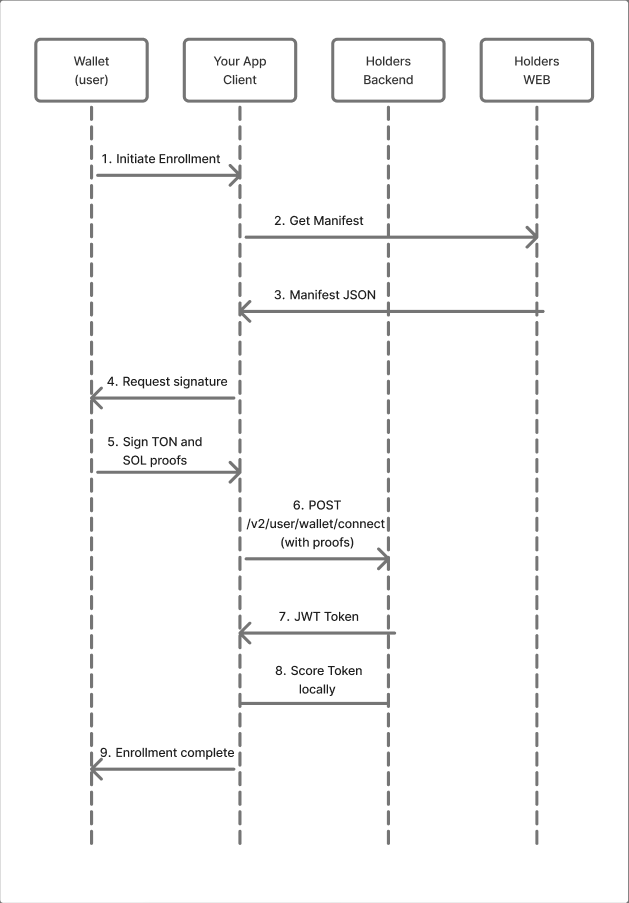
Proof Structure
For authentication, the TonConnect v2 protocol is used. It is necessary to create proof (proof of wallet ownership) for TON and optionally for Solana.TON Proof Structure
interface TonProof {
  timestamp: number;           // Unix timestamp in seconds
  domain: {
    lengthBytes: number;       // Domain length in bytes
    value: string;             // Domain (for example, "holders.io")
  };
  signature: string;           // Base64 signature
  payload: string;             // Arbitrary payload from the server
  walletStateInit: string;     // Wallet StateInit in base64
  publicKey: string;           // Public key in hex
}
TON Proof Creation Algorithm
// 1. Construct the message to sign
const messageBuffer = Buffer.concat([
  Buffer.from('ton-proof-item-v2/'),
  addressBuffer,           // workchain (4 bytes BE) + hash (32 bytes)
  domainLengthBuffer,      // 4 bytes LE
  domainBuffer,            // domain string
  timestampBuffer,         // 8 bytes LE (Int64)
  Buffer.from(payload)     // payload string
]);

// 2. Hash it
const message = sha256(messageBuffer);

// 3. Add prefix
const bufferToSign = Buffer.concat([
  Buffer.from('ffff', 'hex'),
  Buffer.from('ton-connect'),
  message
]);

// 4. Sign
const signature = nacl.sign.detached(sha256(bufferToSign), secretKey);
interface SolanaProof {
  timestamp: number;
  domain: {
    lengthBytes: number;
    value: string;
  };
  signature: string;        // Base58 encoded signature
  payload: string;
  publicKey: string;        // Base58 public key
}
Authentication request format
// Request for TON + Solana
type TonSolanaAuthRequest = [
  {
    stack: 'ton';
    network: 'ton-mainnet' | 'ton-testnet';
    key: {
      kind: 'tonconnect-v2';
      wallet: 'yourwallet';
      config: {
        address: string;          // Raw address format
        proof: TonProof;
      };
    };
    inviteId?: string;            // Optional invite code
    invitationId?: string;        // Optional invitation ID
    appsflyerId?: string;         // AppsFlyer UID for analytics
  },
  {
    stack: 'solana';
    network: 'solana-mainnet' | 'solana-devnet';
    key: {
      kind: 'tonconnect-v2';
      wallet: 'yourwallet';
      config: {
        address: string;          // Base58 address
        proof: SolanaProof;
      };
    };
  }
];
API methods
Wallet connection (Enrollment)
Endpoint:POST /v2/user/wallet/connectRequest:
[
  {
    "stack": "ton",
    "network": "ton-mainnet",
    "key": {
      "kind": "tonconnect-v2",
      "wallet": "yourwallet",
      "config": {
        "address": "0:...",
        "proof": {
          "timestamp": 1706284800,
          "domain": { "lengthBytes": 10, "value": "holders.io" },
          "signature": "base64...",
          "payload": "ton-proof-any",
          "walletStateInit": "base64...",
          "publicKey": "hex..."
        }
      }
    },
    "inviteId": "optional-invite-code"
  },
  {
    "stack": "solana",
    "network": "solana-mainnet",
    "key": {
      "kind": "tonconnect-v2",
      "wallet": "yourwallet",
      "config": {
        "address": "base58...",
        "proof": {
          "timestamp": 1706284800,
          "domain": { "lengthBytes": 10, "value": "holders.io" },
          "signature": "base58...",
          "payload": "solana-proof-any",
          "publicKey": "base58..."
        }
      }
    }
  }
]
{
  "ok": true,
  "token": "jwt-token-string"
}
Getting User State
Endpoint:POST /account/stateRequest:
{
  "token": "jwt-token"
}
{
  "ok": true,
  "state": {
    "state": "ok",
    "notificationSettings": { "enabled": true },
    "suspended": false
  }
}
Accounts list (Private)
Endpoint:POST /v2/account/listRequest:
{
  "token": "jwt-token"
}
{
  "ok": true,
  "list": [
    {
      "id": "account-id",
      "type": "crypto",
      "accountIndex": 0,
      "address": "EQ...",
      "state": "ACTIVE",
      "balance": "1000000000",
      "network": "ton-mainnet",
      "cards": [
        {
          "id": "card-id",
          "status": "ACTIVE",
          "lastFourDigits": "1234",
          "productId": "product-id"
        }
      ],
      "limits": {
        "daily": "100000000",
        "monthly": "1000000000",
        "onetime": "50000000"
      }
    }
  ],
  "prepaidCards": []
}
Public account data (no authorization required)
Endpoint:POST /v2/public/accountsRequest:
{
  "walletKind": "yourwallet",
  "wallets": [
    {
      "network": "ton-mainnet",
      "address": "EQ..."
    },
    {
      "network": "solana",
      "address": "base58..."
    }
  ]
}
{
  "ok": true,
  "accounts": [
    {
      "id": "account-id",
      "accountIndex": 0,
      "address": "EQ...",
      "state": "ACTIVE",
      "balance": "1000000000",
      "network": "ton-mainnet",
      "cards": [
        {
          "lastFourDigits": "1234",
          "productId": "product-id"
        }
      ]
    }
  ]
}
Access Check (Invite Check)
Endpoint:POST /v2/invite/wallet/check/v2Request:
{
  "wallet": "EQ...",
  "network": "ton-mainnet",
  "region": {
    "countryCode": "US",
    "storeFrontCode": "usa"
  },
  "campaignId": "optional-campaign",
  "campaignParams": {}
}
{
  "allowed": true,
  "banner": {
    "id": 1,
    "content": {
      "action": { "en": "Get Card", "ru": "Получить карту" },
      "title": { "en": "Welcome!", "ru": "Добро пожаловать!" },
      "subtitle": { "en": "...", "ru": "..." }
    }
  }
}
User Profile
Endpoint:POST /v2/profile/getRequest:
{
  "token": "jwt-token"
}
{
  "ok": true,
  "data": {
    "userId": "user-id",
    "email": "user@example.com",
    "emailVerified": true,
    "phone": "+1234567890",
    "country": "US",
    "firstName": "John",
    "lastName": "Doe"
  }
}
Card Transaction List
Endpoint:POST /v2/card/eventsRequest:
{
  "token": "jwt-token",
  "cardId": "card-id",
  "limit": 40,
  "cursor": "optional-cursor",
  "order": "desc"
}
{
  "ok": true,
  "data": {
    "events": [
      {
        "type": "charge",
        "id": "event-id",
        "cardId": "card-id",
        "time": 1706284800,
        "data": {
          "accountId": "account-id",
          "amount": "1000000000",
          "currency": "USD",
          "currencyAmount": "10.00"
        }
      }
    ],
    "cursor": "next-cursor",
    "more": true
  }
}
Apple Pay Credentials
Endpoint:POST /v2/card/provisioning/listRequest:
{
  "token": "jwt-token"
}
{
  "ok": true,
  "cards": [
    {
      "id": "card-id",
      "lastFourDigits": "1234",
      "title": "Holders Card",
      "cardholderName": "JOHN DOE",
      "assetName": "card-asset",
      "assetUrl": "https://..."
    }
  ]
}
WebView integration
WebView architecture flowchart
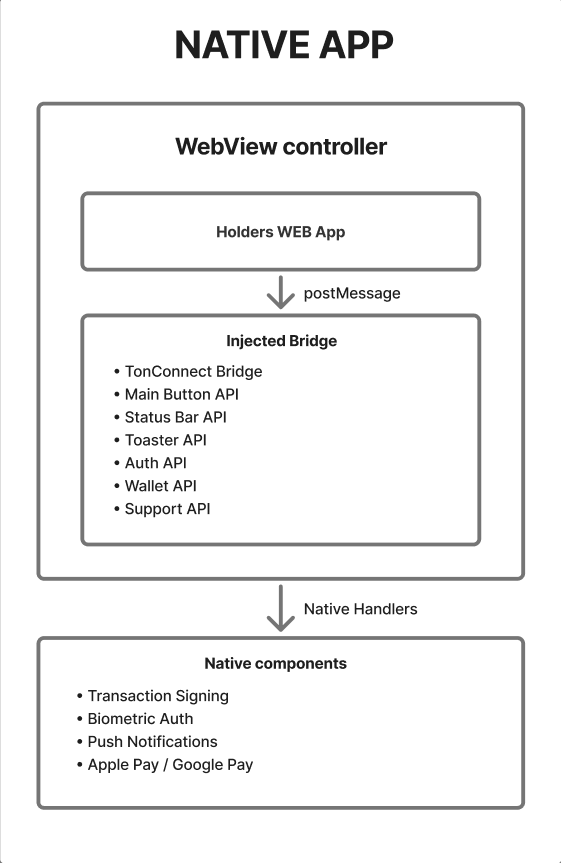
URL parameters
When loading the Holders WebApp, you need to pass the following query parameters:const queryParams = new URLSearchParams({
lang: 'en', // Language: 'en' | 'ru'
currency: 'USD', // Display currency
theme: 'holders', // Theme
'theme-style': 'dark', // 'dark' | 'light'
bounceable: 'false', // Address format
'initial-route': '/accounts' // Initial route
});
const url = `https://tonhub.holders.io?${queryParams.toString()}`;
Types
| Param name | Value |
|---|---|
| lang | en |
| currency | currency code |
| theme | theme code |
| theme-style | dark |
const supportedCurrencies = [
  { code: 'USD', symbol: '$', label: 'U.S. Dollar' },
  { code: 'EUR', symbol: '€', label: 'Euro' },
  { code: 'RUB', symbol: '₽', label: 'Russian Ruble' },
  { code: 'GBP', symbol: '£', label: 'British Pound' },
  { code: 'CHF', symbol: '₣', label: 'Swiss Franc' },
  { code: 'CNY', symbol: '¥', label: 'Chinese Yuan' },
  { code: 'KRW', symbol: '₩', label: 'South Korean Won' },
  { code: 'IDR', symbol: 'Rp', label: 'Indonesian Rupiah' },
  { code: 'INR', symbol: '₹', label: 'Indian Rupee' },
  { code: 'JPY', symbol: '¥', label: 'Japanese Yen' }
];
Initial state injection
const initialState = {
  user: {
    status: {
      state: 'ok',
      kycStatus: null,
      suspended: false
    },
    token: 'jwt-token'
  },
  accountsList: [...],
  prepaidCards: [...]
};

const injectedJS = `
  window.initialState = ${JSON.stringify(initialState)};
`;
TonConnect Bridge for WebView
interface TonConnectInjectedBridge {
  deviceInfo: DeviceInfo;
  protocolVersion: number;
  isWalletBrowser: boolean;

  // Connect a new app
  connect(
    protocolVersion: number,
    request: ConnectRequest
  ): Promise<ConnectEvent>;

  // Restore an existing connection
  restoreConnection(): Promise<ConnectEvent>;

  // Disconnect
  disconnect(): Promise<void>;

  // Send requests (transactions, data signing)
  send<T extends RpcMethod>(request: AppRequest<T>): Promise<WalletResponse<T>>;
}
Query API
WebView can control the native application via URL parameters:| Parameter | Values | Description |
|---|---|---|
closeApp | true | Close WebView |
openEnrollment | true | Start the registration process |
openUrl | URL | Open a URL in the browser |
backPolicy | back / close / lock | “Back” button behavior |
lockScroll | true / false | Scroll locking |
showKAV | true / false | Show keyboard accessory view |
User states
User state transition flowchart
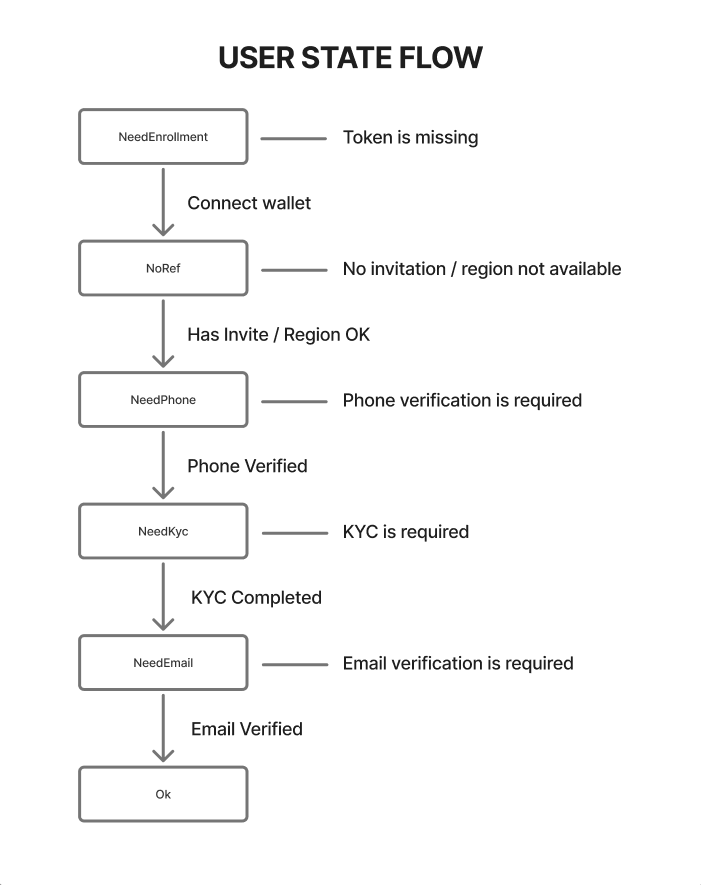
State handling
enum HoldersUserState {
  NeedEnrollment = 'need-enrollment',
  NeedPhone = 'need-phone',
  NoRef = 'no-ref',
  NeedKyc = 'need-kyc',
  NeedEmail = 'need-email',
  Ok = 'ok',
}

async function handleUserState(token: string): Promise<void> {
  const state = await fetchUserState(token);

  switch (state.state) {
    case HoldersUserState.NeedEnrollment:
      // Show the registration screen
      navigateToEnrollment();
      break;

    case HoldersUserState.NoRef:
      // Show the waiting/waitlist screen
      showWaitlistScreen();
      break;

    case HoldersUserState.NeedPhone:
      // Redirect to phone verification in WebView
      openHoldersWebView('/phone-verification');
      break;

    case HoldersUserState.NeedKyc:
      // Redirect to KYC in WebView
      openHoldersWebView('/kyc');
      break;

    case HoldersUserState.NeedEmail:
      // Redirect to email verification in WebView
      openHoldersWebView('/email-verification');
      break;

    case HoldersUserState.Ok:
      // Full access
      openHoldersWebView('/accounts');
      break;
  }
}
Code examples
TypeScript: Full authentication flow
import { Address, beginCell, storeStateInit } from '@ton/core';
import { sha256_sync } from '@ton/crypto';
import nacl from 'tweetnacl';
import { Int64LE } from 'int64-buffer';

interface WalletKeys {
  publicKey: Buffer;
  secretKey: Buffer;
}

interface EnrollmentResult {
  success: boolean;
  token?: string;
  error?: string;
}

class HoldersIntegration {
  private endpoint: string;
  private isTestnet: boolean;

  constructor(isTestnet: boolean = false) {
    this.isTestnet = isTestnet;
    this.endpoint = isTestnet
      ? 'https://card-staging.whales-api.com'
      : 'https://card-prod.whales-api.com';
  }

  /**
   * TON Proof creating
   */
  private createTonProof(
    address: Address,
    keys: WalletKeys,
    domain: string,
    payload: string,
    walletStateInit: string
  ) {
    const timestamp = Math.floor(Date.now() / 1000);
    const timestampBuffer = new Int64LE(timestamp).toBuffer();

    const domainBuffer = Buffer.from(domain);
    const domainLengthBuffer = Buffer.allocUnsafe(4);
    domainLengthBuffer.writeInt32LE(domainBuffer.byteLength);

    const rawAddress = address.toRawString();
    const [workchain, addrHash] = rawAddress.split(':');

    const addressWorkchainBuffer = Buffer.allocUnsafe(4);
    addressWorkchainBuffer.writeInt32BE(Number(workchain));

    const addressBuffer = Buffer.concat([
      addressWorkchainBuffer,
      Buffer.from(addrHash, 'hex'),
    ]);

    const messageBuffer = Buffer.concat([
      Buffer.from('ton-proof-item-v2/'),
      addressBuffer,
      domainLengthBuffer,
      domainBuffer,
      timestampBuffer,
      Buffer.from(payload),
    ]);

    const message = sha256_sync(messageBuffer);

    const bufferToSign = Buffer.concat([
      Buffer.from('ffff', 'hex'),
      Buffer.from('ton-connect'),
      message,
    ]);

    const signed = nacl.sign.detached(
      sha256_sync(bufferToSign),
      Uint8Array.from(keys.secretKey)
    );

    return {
      timestamp,
      domain: {
        lengthBytes: domainBuffer.byteLength,
        value: domain,
      },
      signature: Buffer.from(signed).toString('base64'),
      payload,
      walletStateInit,
      publicKey: keys.publicKey.toString('hex'),
    };
  }

  /**
   * Fetching the application manifest
   */
  async getManifest() {
    const manifestUrl = this.isTestnet
      ? 'https://yourwallet-stage.holders.io/jsons/tonconnect-manifest.json'
      : 'https://yourwallet.holders.io/jsons/tonconnect-manifest.json';

    const response = await fetch(manifestUrl);
    return response.json();
  }

  /**
   * Wallet connect (enrollment)
   */
  async enrollWallet(
    address: Address,
    keys: WalletKeys,
    walletStateInit: string,
    inviteId?: string
  ): Promise<EnrollmentResult> {
    try {
      const manifest = await this.getManifest();
      const domain = new URL(manifest.url).hostname;

      const tonProof = this.createTonProof(
        address,
        keys,
        domain,
        'ton-proof-any',
        walletStateInit
      );

      const requestBody = [
        {
          stack: 'ton',
          network: this.isTestnet ? 'ton-testnet' : 'ton-mainnet',
          key: {
            kind: 'tonconnect-v2',
            wallet: 'yourwallet',
            config: {
              address: address.toRawString(),
              proof: tonProof,
            },
          },
          inviteId,
        },
      ];

      const response = await fetch(`${this.endpoint}/v2/user/wallet/connect`, {
        method: 'POST',
        headers: { 'Content-Type': 'application/json' },
        body: JSON.stringify(requestBody),
      });

      const data = await response.json();

      if (!data.ok) {
        return { success: false, error: 'Failed to fetch user token' };
      }

      return { success: true, token: data.token };
    } catch (error) {
      return { success: false, error: String(error) };
    }
  }

  /**
   * Fetching the user state
   */
  async getUserState(token: string) {
    const response = await fetch(`${this.endpoint}/account/state`, {
      method: 'POST',
      headers: { 'Content-Type': 'application/json' },
      body: JSON.stringify({ token }),
    });

    if (response.status === 401) {
      return null;
    }

    const data = await response.json();

    if (!data.ok) {
      throw new Error('Failed to fetch account state');
    }

    return data.state;
  }

  /**
   * Fetching the account list
   */
  async getAccounts(token: string) {
    const response = await fetch(`${this.endpoint}/v2/account/list`, {
      method: 'POST',
      headers: { 'Content-Type': 'application/json' },
      body: JSON.stringify({ token }),
    });

    const data = await response.json();

    if (!data.ok) {
      throw new Error('Failed to fetch accounts');
    }

    return {
      accounts: data.list,
      prepaidCards: data.prepaidCards,
    };
  }

  /**
   * Public account data (no authorization)
   */
  async getPublicAccounts(address: string, solanaAddress?: string) {
    const body = solanaAddress
      ? {
          walletKind: 'yourwallet',
          wallets: [
            { network: this.isTestnet ? 'ton-testnet' : 'ton-mainnet', address },
            { network: 'solana', address: solanaAddress },
          ],
        }
      : {
          walletKind: 'yourwallet',
          network: this.isTestnet ? 'ton-testnet' : 'ton-mainnet',
          address,
        };

    const response = await fetch(`${this.endpoint}/v2/public/accounts`, {
      method: 'POST',
      headers: { 'Content-Type': 'application/json' },
      body: JSON.stringify(body),
    });

    const data = await response.json();

    if (!data.ok) {
      throw new Error('Failed to fetch public accounts');
    }

    return data.accounts;
  }

  /**
   * Access check
   */
  async checkInvite(address: string, countryCode: string) {
    const response = await fetch(`${this.endpoint}/v2/invite/wallet/check/v2`, {
      method: 'POST',
      headers: { 'Content-Type': 'application/json' },
      body: JSON.stringify({
        wallet: address,
        network: this.isTestnet ? 'ton-testnet' : 'ton-mainnet',
        region: { countryCode },
      }),
    });

    return response.json();
  }
}

// Usage example
async function example() {
  const holders = new HoldersIntegration(false); // Production

  // Create a proof and connect the wallet
  const result = await holders.enrollWallet(
    Address.parse('EQ...'),
    { publicKey: Buffer.from('...'), secretKey: Buffer.from('...') },
    'base64-state-init...',
    'optional-invite-code'
  );

  if (result.success && result.token) {
    // Save the token
    localStorage.setItem('holders-token', result.token);

    // Fetch the state
    const state = await holders.getUserState(result.token);
    console.log('User state:', state);

    // Fetch the accounts
    if (state.state === 'ok') {
      const accounts = await holders.getAccounts(result.token);
      console.log('Accounts:', accounts);
    }
  }
}
React Native: WebView component
import React, { useRef, useMemo, useCallback } from 'react';
import { View } from 'react-native';
import WebView, { WebViewMessageEvent } from 'react-native-webview';

interface HoldersWebViewProps {
  token: string;
  userState: any;
  accounts?: any[];
  onClose?: () => void;
  isTestnet?: boolean;
}

export function HoldersWebView({
  token,
  userState,
  accounts,
  onClose,
  isTestnet = false,
}: HoldersWebViewProps) {
  const webViewRef = useRef<WebView>(null);

  const baseUrl = isTestnet
    ? 'https://tonhub-stage.holders.io'
    : 'https://tonhub.holders.io';

  const source = useMemo(() => {
    const params = new URLSearchParams({
      lang: 'en',
      currency: 'USD',
      theme: 'holders',
      'theme-style': 'dark',
      'initial-route': '/accounts',
    });

    return { uri: `${baseUrl}?${params.toString()}` };
  }, [baseUrl]);

  // Initial state injection
  const injectedJS = useMemo(() => {
    const initialState = {
      user: {
        status: {
          state: userState.state,
          suspended: userState.suspended || false,
        },
        token,
      },
      accountsList: accounts || [],
    };

    return `
      (function() {
        window.initialState = ${JSON.stringify(initialState)};
      })();
      true;
    `;
  }, [token, userState, accounts]);

  // Handling messages from the WebView
  const handleMessage = useCallback((event: WebViewMessageEvent) => {
    try {
      const message = JSON.parse(event.nativeEvent.data);

      switch (message.type) {
        case 'closeApp':
          onClose?.();
          break;

        case 'sendTransaction':
          // Transaction handling
          handleTransaction(message.payload);
          break;

        case 'loaded':
          // WebView loaded
          console.log('Holders WebView loaded');
          break;
      }
    } catch (error) {
      console.error('Failed to parse WebView message:', error);
    }
  }, [onClose]);

  return (
    <View style={{ flex: 1 }}>
      <WebView
        ref={webViewRef}
        source={source}
        injectedJavaScriptBeforeContentLoaded={injectedJS}
        onMessage={handleMessage}
        allowsInlineMediaPlayback
        javaScriptEnabled
        domStorageEnabled
      />
    </View>
  );
}
Interaction flowcharts
Full Holders workflow
.png?fit=max&auto=format&n=sYcwF1WqD1mDpark&q=85&s=4ea34aedeb560eeec405e3e47c52676a)
Handling transactions via TonConnect
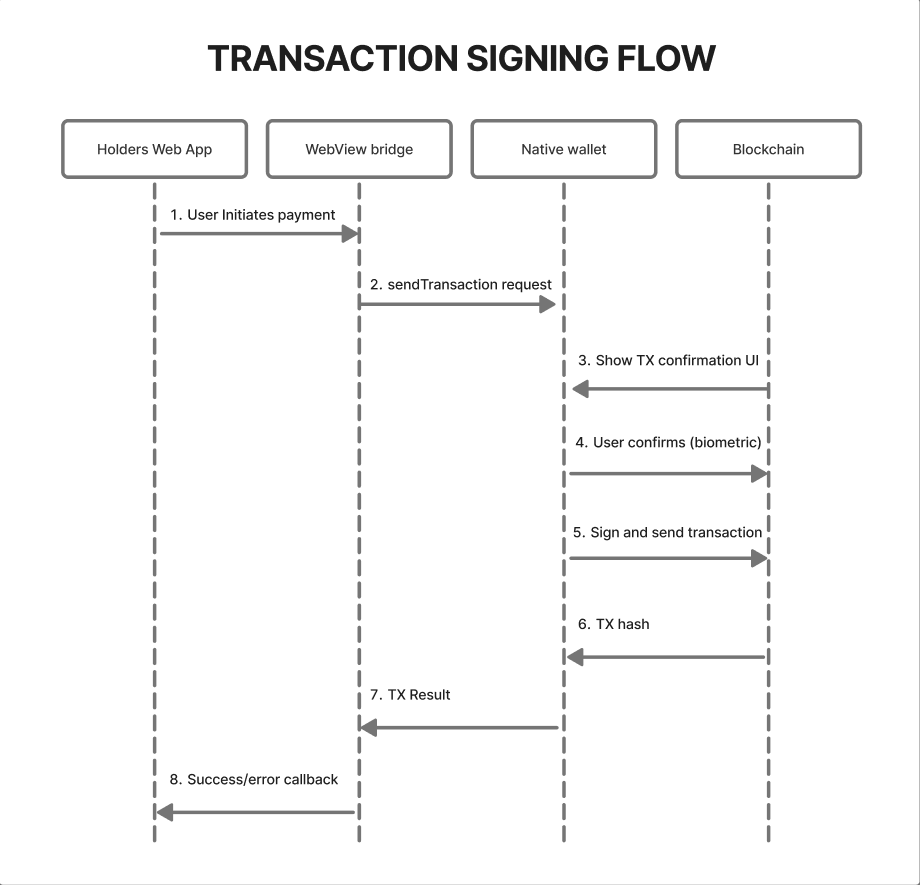
Push notifications
The Holders platform implements a push notification system that informs users about key operations being performed. For each integration project, it is recommended to individually determine the optimal mechanism for delivering notifications to end users. For questions regarding the configuration of this functionality, please contact the Holders integration manager.Data storage
Recommended storage structureTypescript
interface HoldersStorage {
  // JWT token by wallet address
  getToken(address: string): string | null;
  setToken(address: string, token: string): void;
  deleteToken(address: string): void;

  // Apple Pay credentials
  getProvisioningCredentials(): ProvisioningCredential[];
  setProvisioningCredentials(creds: ProvisioningCredential[]): void;

  // Invite/referral data
  getInviteId(): string | null;
  setInviteId(id: string): void;

  // Campaign parameters
  getCampaignParams(): Record<string, string>;
  setCampaignParams(params: Record<string, string>): void;
}