
What is onboarding
Onboarding in Holders represents a structured process of integrating a mobile wallet user with the functional capabilities of the Holders SDK. Within this process, the user creates a personal Holders profile, provides necessary consents for data processing, and performs the primary key action — account funding — to ensure full access to Holders functionality within the wallet.Onboarding goals
- Explain the value of Holders
- Guide through profile creation
- Collect necessary consents and permissions
- Lead to the first target action
- Reduce churn and misunderstanding
- Filter out unsuitable users
Onboarding start and end conditions
Onboarding start
Onboarding begins on the main page of the mobile wallet or application into which Holders is integrated, typically with the display of a banner or pop-up window offering account opening and card issuance. The banner is shown by default to all application users regardless of their residency.The banner or window is displayed in the language selected as primary in the mobile application.
Onboarding completion
Onboarding is considered complete if the user successfully funds their account in the Holders system. In all other cases, onboarding is considered incomplete.Onboarding flowchart
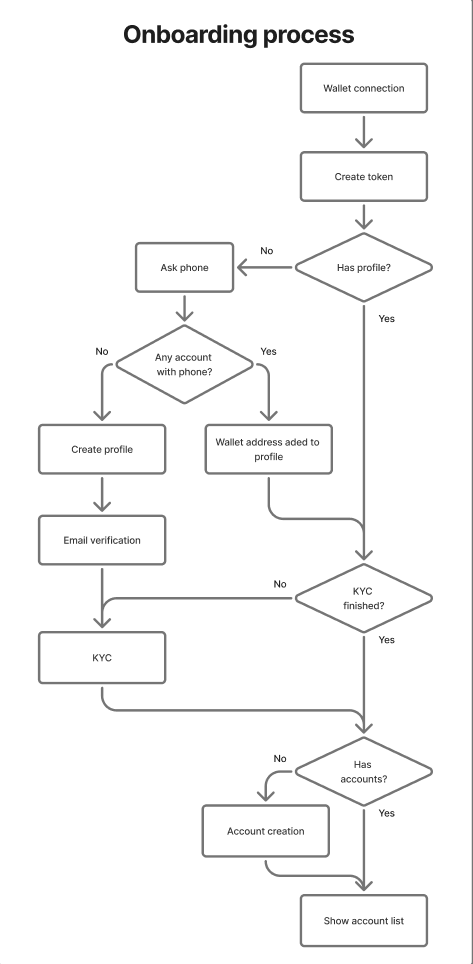
Main Stages
- Wallet connection — performed automatically in the background using the Ton Connect protocol or adapter for the Solana blockchain.
- User token creation — procedure for transmitting identification data to the Holders server-side system.
- Profile creation — executed when the user confirms their mobile phone number. At this stage, a primary record is created in the Holders database.
- KYC — user verification procedure through a partner service (Sumsub).
- Account creation — smart contract deployment and issuance of the first card (card issuance is possible when residency requirements are met).
- Account funding — transferring funds to the created account.
More about wallet connection
Tonhub uses a single cryptographic key (Ed25519) to work with both networks: TON and Solana. This is possible because both networks use the same signature algorithm.TON Connection
Connection Process
- Application manifest retrieval - Tonhub loads the TonConnect manifest from the Holders server (
/jsons/tonconnect-manifest.json), which contains the application name, URL, and icon. - User authentication - The user confirms the operation through biometry or PIN code to access the wallet’s secret key.
- TON Proof creation - A cryptographic proof of wallet ownership is formed:
- The wallet address is taken in
workchain:hashformat - The Holders domain is added (e.g.,
tonhub.holders.io) - Current timestamp is added
- Payload is added (random string from server)
- All this is hashed and signed with the wallet’s secret key
- The wallet address is taken in
- Server submission - A POST request is sent to
/v2/user/wallet/connectwith data:- Wallet address
stack: 'ton'network: 'ton-mainnet'or'ton-testnet'wallet: 'tonhub'- TON Proof (timestamp, domain, signature, payload)
- Public key
- Wallet StateInit (for address verification)
- Token retrieval - The Holders server verifies the signature and returns a User Token (JWT).
What the server verifies
- Signature validity (that it was made by the owner of the specified address)
- Public key correspondence to address through StateInit
- Timestamp relevance (protection against replay attacks)
- Domain correctness
Solana Connection
Key Feature
Tonhub uses the same Ed25519 key for Solana as for TON. This is possible because:- TON and Solana use the same signature algorithm (Ed25519)
- The TON wallet’s public key is directly converted to a Solana address
Connection Process
- Solana address retrieval - The TON wallet’s public key (32 bytes) is interpreted as a Solana PublicKey and converted to Base58 format.
- Solana Proof creation - Formed similarly to TON Proof:
- The Solana address is taken (public key in Base58)
- Holders domain is added
- Timestamp is added
- Payload is added
- Signed with the same secret key
- Difference: signature is encoded in Base58 (not Base64 as for TON)
- Server submission - Simultaneously with TON, Solana proof is sent:
- Solana address (public key in Base58)
- Solana Proof
stack: 'solana'network: 'solana-mainnet'or'solana-devnet'
Result
The Holders server links both accounts (TON and Solana) to one user and issues a unified User Token for access to both.What is User token
User Token is a JWT (JSON Web Token) that is issued by the Holders server after successful authentication and serves as the user’s session identifier.What is it used for
Where it’s stored
- Token is saved locally in the device’s secure storage (MMKV)
- Linked to a specific TON wallet address
When it’s deleted
- 401 response from API - token expired or invalid
- New invite code - when re-attempting registration by invitation
- Migration - when updating token format (e.g., transition to TON+Solana)