
What is Whales Club
Whales Club is a limited NFT collection, where each token grants the holder membership in a private Telegram community, as well as access to exclusive staking pools on the Ton Whales platform.Maximum NFT quantity: 10,000
Number of minted NFTs: 2,652
Number of unique holders: 527
Total sales revenue: 605,586 TON
Club Communities
Club Telegram channels:- https://t.me/tonwhalesnften - open club channel in English
- https://t.me/tonwhalesnft - open club channel for all languages
- https://t.me/whalesclub_bot - bot for accessing private club channels
Mint Smart Contract
The smart contract allows users to obtain (mint) NFTs with random attributes by sending funds to its address. The user’s address becomes the owner address upon minting. Users can mint one or multiple items. The quantity is calculated based on the amount sent.A key feature of the mint smart contract is dynamic pricing with constant token price increases. The price increased according to the algorithm presented in the table below. The step size decreased proportionally to the current price, ensuring rapid price growth in the initial stage followed by a slowdown in growth rates.
Example: the first whale in the collection cost 100 TON, the next one cost 100.6 TON, and so on. Once the whale price reaches 399 TON, the step decreases from 0.6 to 0.05 TON.
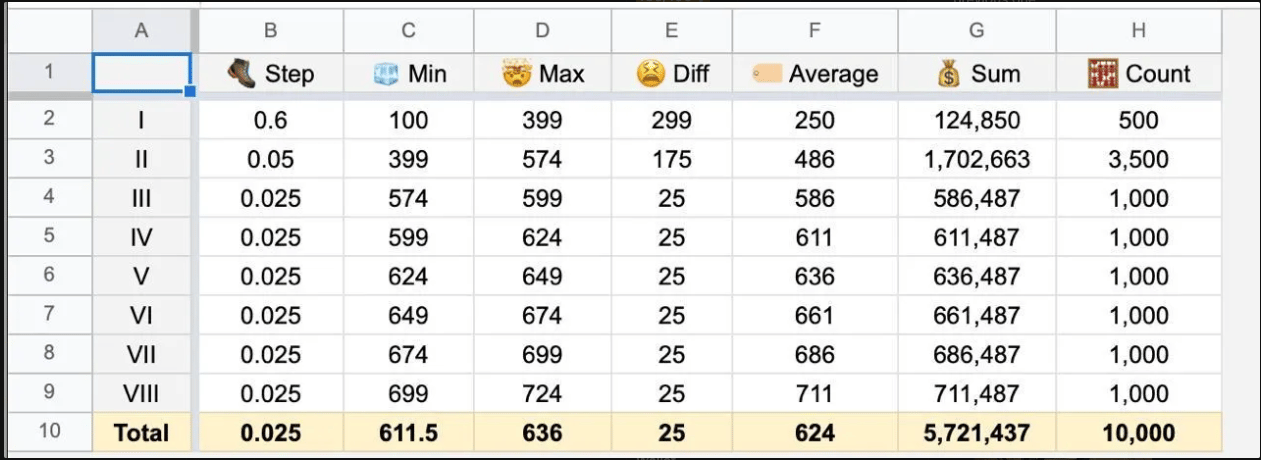
- Collection mint contract
- Individual item mint contract
Collection mint contract
Allows creating a collection with specified parameters.Link: https://github.com/tonwhales/nft-minter\ Language: TypeScript
Main Operations
Ifsender_address == ctx_owner → **admin handler **op_owner:
op::update— change parameters:ctx_sale_opened,ctx_total_supply,ctx_mint_limit,ctx_price,ctx_step(with limit/minimum price checks).
op::close— close sale (sale_opened=false, mintLimit=minted).op::open— open/expand sale (+countto mintLimit, newstep,sale_opened=true).op::upgrade— update code (write newcode).op::purchase— mint on behalf of owner (proceeds toop_purchase, flag indicates buyer is owner).op::topup— simply accept funds (no logic).op::update_content— updatecontent(URIs).op::transfer_ownership— changeowner.op::update_royalty_params— update royalty.op == 0+ text"NFT"— mint 1 NFT (text form).
op == 0and string"NFT"→ single mint (op_purchase(sender, ..., count=1)).op::purchase→ mintcountNFT (op_purchase(sender, ..., count)).
How to Start Mint
- Generate BOC:
- Through script:
bash, it will outputOpen:<base64 BOC>.
Open: <base64 BOC>.
-
or programmatically call
createOpenMessage(count, step). 2. Send internal message: - recipient — collection address,
-
sender —
ownerwallet, - body — this BOC,
- value — some reserve for commission (e.g. 0.1–0.2 TON, depends on network).
sale_opened = true,mintLimitincreased,- minting through
purchase/"NFT"becomes possible within the new limit.
How to stop mint
- Generate BOC:
createCloseMessage().toBoc().toString('base64')(or runclose.ts). - Send internal message:
- to collection address,
- from owner wallet,
- body = this BOC,
- with small amount of TON for gas.
How to update collection royalty
factor / base= royalty share (e.g.5 / 100 = 5%),address— where royalties go.
How to change collection owner
Works only if sender = current owner.- In
manage/mainnet/transfer-ownership.ts:- in
Address.parse('')enter the new owner’s address (string in friendly format).
- in
- Run the script:
- It will output a link of the form:
- Open this link with the current owner’s wallet (the one recorded in
owner/ctx_owner) and confirm the transaction.
Individual item mint contract
Allows the owner to specify the buyer’s wallet address for a specific item in the collection.Link: https://github.com/tonwhales/nft-contract\ Language: Solidity
Main Operations
op_transfer(slice cs) - transfer of an already existing token.op_award(slice cs) - distribution of uninitialized NFT (airdrop) to a specific address.op_update_metadata(slice cs) - updating collection’s general metadata.op_mint(slice cs) - mint new token according to minting settings.op_ping(slice cs) - ensures the contract is alive and you are the owner.op_upgrade(slice cs) - contract code update.
Mint History and Fees
Wallets for collecting funds
Initially, sales proceeds were sent to a wallet that was subsequently replaced with another one. Currently, all royalties from the secondary market are sent to the new NFT treasury wallet.Secondary market
The company receives royalties from whale sales on the secondary market. Royalties amount to 5% of each whale sale and can be changed by the collection owner. Additionally, 5% of the sale goes to the marketplace where the sale occurs - this share cannot be changed. All royalties are sent to the same wallet that receives mint proceeds and can be withdrawn by the wallet owner.Telegram Club Bot
Any NFT whale owner gets access to the private Ton Whales chat in TG. In the chat, users can communicate with the company’s CEO, make new connections, and learn news. Access to the chat is provided through the bothttps://t.me/whalesclub_bot\ The bot works in inline mode and can be called from any chat.
Instructions for entering the chat
- Go to the bot https://t.me/whalesclub_bot
- Choose how you want to verify yourself
- Through Tonhub - this method allows you to scan a QR code with the wallet app that has the address containing the NFT whale open.
- Through another wallet - this method allows you to send a minimal transaction to the address specified by the bot from the address containing the NFT whale.
- In the response message, the bot will send links to enter the private chats.
How the bot checks for NFT ownership
The bot is an admin and every two hours checks all chat participants for NFT tokens in their wallets (the bot accesses the same page as the staker). If the corresponding NFT is absent, the participant is automatically removed from the chat.It should be noted that the bot does not account for NFT movement to sale contract addresses, meaning users who have listed their NFT for sale without actual completion retain access to the chat.
Bot buttons and commands
- My profile - allows the user to fill out a form for the handshake system.
- Whales club staking pools - redirects the user to the staking page.
- Show my whales - generates a gif with all the user’s whales.
- Set the club status - allows sending an application for club status.
- Join the club - generates links to enter the club’s private chats.
- Members projects section - allows submitting an application to feature a project in the projects section on the website.
- Accelerator program - submitting an application to the project support program.
- My wallets - allows adding multiple wallets to combine into one profile
- /mywhales - command allows sharing a gif with all club member’s whales in any chat
Additional features
- Each new completed profile from the handshake system is automatically published by the bot in club chats.
- Each new project posted by participants on the project board is automatically published by the bot in club chats.
- Each NFT whale sold on the secondary market is automatically published by the bot in club chats with the sale price indicated.
Handshake System
The handshake system enables anonymous introductions between club members. Users create a profile in the club bot, specifying their field of activity and a brief description of their occupation. The profile is posted on the page: Other users can send a handshake (express interest) to the profile owner, attaching a brief message. The handshake recipient is notified through the bot about the expressed interest in their profile and gets the opportunity to review the sender’s profile. The user can accept the introduction proposal, ignore it, or decline it. When accepting the proposal, participants gain access to each other’s Telegram usernames.The handshake receiving function can be disabled by the user in the club bot settings. When this option is deactivated, the handshake sending button in the user’s profile becomes unavailable.
The handshake system does not function for users without a set username in Telegram — in such cases, the bot returns an error message.
Club Statuses
To simplify the adaptation of new members in club chats, a status system has been implemented. The status is displayed to the right of the user’s name and contains information that facilitates faster and more effective participant identification. In essence, a status is an admin role with additional privileges disabled.It should be noted that the number of administrators in a Telegram chat is limited to 50 users, which is why a status verification system was implemented.
How to Set a Status
- The user goes to the club bot, section Set the club status.
- The user specifies the status they want to see in their chat profile.
- A status change request is sent to the NFT admin panel.
- The administrator can approve or reject the request (in case the status does not provide useful information for other users).
Individual User Rating
A user’s rating in the club is an indicator that displays their activity, as well as the rarity and quantity of NFT whales they own. The rating is displayed on the user’s card on the page.What the Rating is For
- The rating determines the position of the user’s card on the club members page: participants with higher ratings are placed at the top of the general list. Profiles of users with high ratings receive increased attention, providing enhanced networking opportunities.
- Participants in the top 15 by rating get exclusive access to place funds in the most profitable staking pool of Ton Whales — Team Pool.
How the Rating is Formed
The rating consists of two main parts:- Rarity score of their NFT whales
- Bonus for completing the profile
Rarity Score of Whales
The sum of rarity scores of all the user’s whales. Each whale has a different number of points depending on the rarity of its attributes (cigars, flags, toys, etc.). The rarity score of a specific whale can be viewed on the preview page by entering its rank.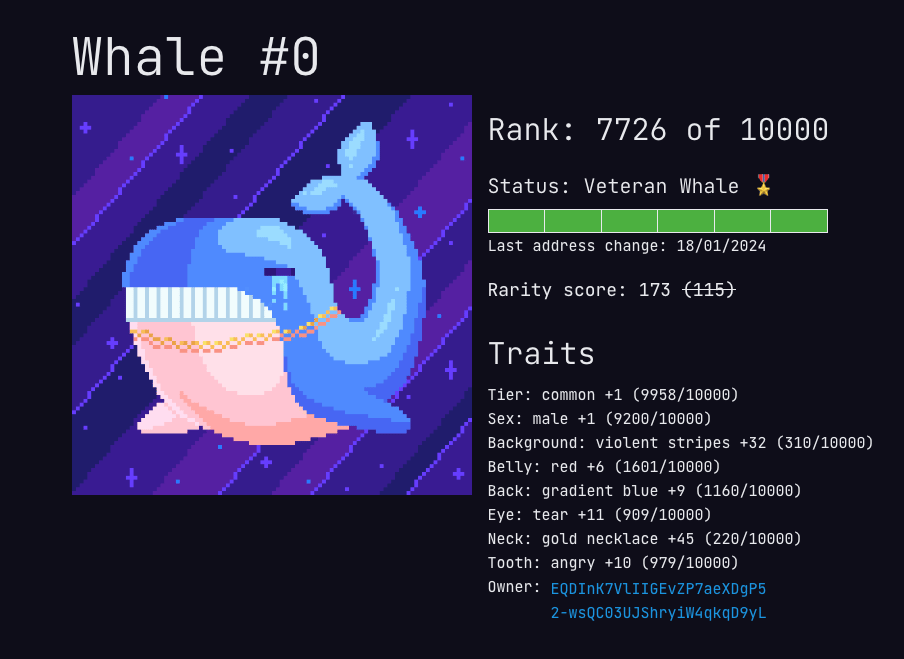
If there are multiple whales, all rarity scores of all user’s whales will be added together to calculate the user’s rating.
Special Whales
There are several types of whales in the collection:- Regular whales - almost all whales in the collection. They have different rarity score indicators depending on their attributes.
- Tagged whales - whales that have a tag on their tail. In addition to bonuses for regular attributes, they have an additional bonus of 3000 points to the user’s rating.
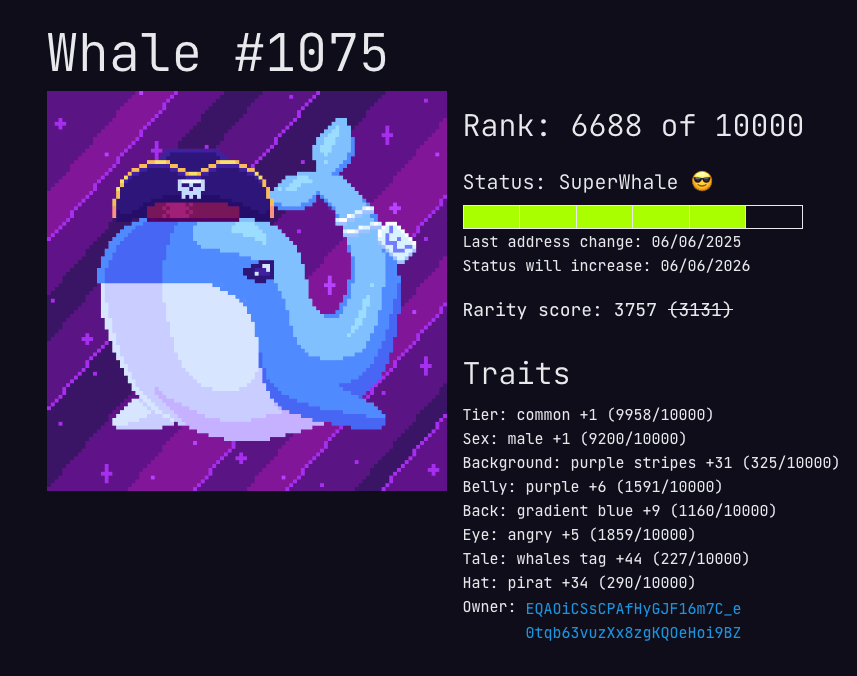
- Legendary whales represent a limited number of NFT tokens that are visually distinct from standard collection items. These tokens feature exclusive accessories and provide a significant boost to user rating, practically guaranteeing the owner’s placement in the top rankings. Owning a legendary whale grants access to the Team Pool regardless of the total accumulated rating points, even without reaching the standard threshold value required for participation in this pool.
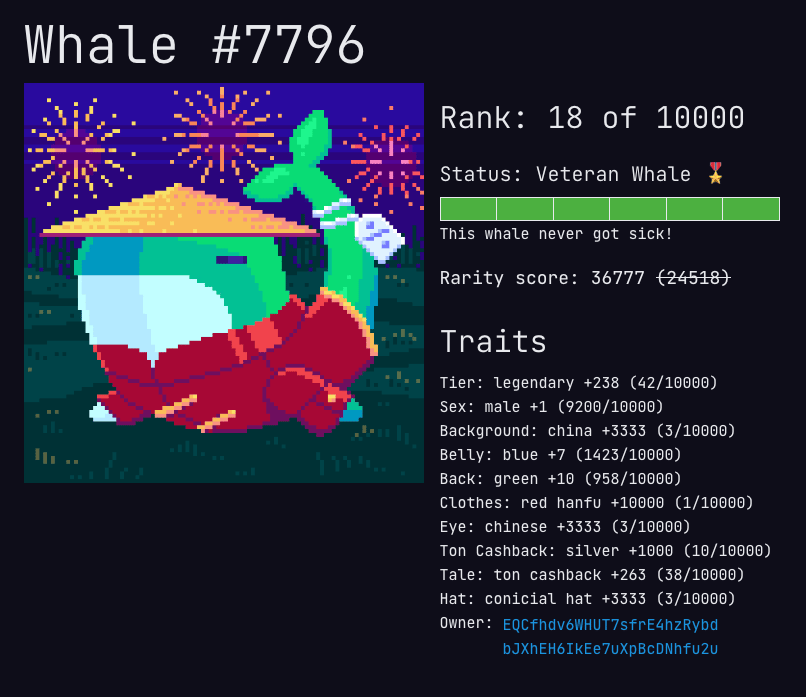
Important: The rarity indicator of whales may differ between the Ton Whales system and marketplaces. This discrepancy is due to the fact that marketplaces calculate the rarity indicator exclusively based on already minted NFT tokens, while the Ton Whales system takes into account the complete collection of 10,000 items. The reference value for the rarity indicator is considered to be the calculation performed by the Ton Whales system.
Whale Health System
To motivate users to remove whales from sale and hold them longer, a whale health system was implemented. This system affects the whale’s rarity score if it has been put up for sale.Health system parameters:
NFT token currently in active sale — 0% of base rating
NFT token removed from sale less than a month ago — 50% of base rating
NFT token removed from sale less than three months ago — 75% of base rating
NFT token not listed for sale for 3-6 months — 100% of base rating
NFT token not listed for sale for 6-12 months — 125% of base rating
Whale not listed for sale for more than a year — 150% rating
Mixtures Collection (Health Recovery)
For cases when a user wants to quickly restore the rarity score of all their whales (for example, to gain access to a team pool), an additional collection was released — Whales’ mixtures. Using this mixture provides instant full restoration of the rarity score of all user’s whales to 100%.To use the mixture, the user must transfer it to the NFT treasury wallet and notify the project manager or community manager about it. The manager logs into the administrative panel and manually sets the health indicator of each user’s whale to 100%, which immediately improves their position in the rating table.
Currently, mixtures are available for purchase exclusively on the secondary market.