> ## Documentation Index
> Fetch the complete documentation index at: https://whalescorp.mintlify.site/llms.txt
> Use this file to discover all available pages before exploring further.
# Account operations
> This document briefly explains all main account operations in Holders and how they affect the account.
# Account Operations
1. **Opening a new account** – creating a new account with its own balance and the ability to issue cards.
2. **Account closure** — the procedure for permanently terminating account services, making operations on this account impossible, and transferring remaining funds in accordance with established regulations.
3. **Account funding** — the operation of crediting funds to an account through available deposit methods.
4. **Withdrawal from account** — the operation of transferring funds from an account using provided withdrawal methods.
5. **Payments** — operations for sending funds from an account using available transfer methods.
6. **Setting account limits** — the procedure for determining and adjusting spending restrictions (limits per individual operation, daily, monthly, and other time-based restrictions).
# Opening a New Account
Opening a new account is available to all Holders users who have residency in countries not on the sanctions list. The number of accounts that can be opened per user is unlimited.
## Conditions for Opening a New Account
* User profile must pass KYC verification procedure
## Available Account Currencies
* **USDC (SOL)** — publicly available currency for all account types
* **TON** — publicly available currency for regular accounts (not vesting)
* **USDY (SOL)** — currently in testing mode. Will be available for both regular and vesting accounts.
* **USDT (TON)** — support discontinued
## Interface
1. Opening a new account is available to the user from the main wallet page. The user clicks on Add new account and selects the type of account they want to open. Three possible options are available:
1. **Account with card** — the first card is issued free of charge, subsequent card issuance is paid.
2. **Account without card** — a card can be additionally issued at any time.
3. **Vesting account** — provides the ability to create automatic payments to beneficiaries from the account.
(1).png?fit=max&auto=format&n=5wXm9PjfIP9qNCh-&q=85&s=a0ef4ac8ec81061cf515579bbff74468 "Chooseaproduct(2)(1)") 2. The user selects the currency for the account being created
2. The user selects the currency for the account being created
(1).png?fit=max&auto=format&n=5wXm9PjfIP9qNCh-&q=85&s=14a94c97ab6ead1d0fb7d87af8f35a5b "Currency(2)(1)") 3. The system deploys a smart contract on the blockchain, after which the created account becomes available to the user
# Account Closure
Account closure is an operation to decommission an account, making it impossible to conduct deposit, withdrawal, and transfer operations. The account is removed from the user interface and moved to the final CLOSED status. Before executing the closure procedure, the system checks for the absence of active cards linked to the account. Remaining funds (if any) are transferred to the account owner's wallet in accordance with established regulations.
**Important:** In case of a refund to a closed account, automatic transfer to an active account is not performed. The refund is moved to pending payment status and is subject to distribution after the closed account owner contacts technical support.
## Interface
1. The user goes to settings and selects Close account and confirms the closure
3. The system deploys a smart contract on the blockchain, after which the created account becomes available to the user
# Account Closure
Account closure is an operation to decommission an account, making it impossible to conduct deposit, withdrawal, and transfer operations. The account is removed from the user interface and moved to the final CLOSED status. Before executing the closure procedure, the system checks for the absence of active cards linked to the account. Remaining funds (if any) are transferred to the account owner's wallet in accordance with established regulations.
**Important:** In case of a refund to a closed account, automatic transfer to an active account is not performed. The refund is moved to pending payment status and is subject to distribution after the closed account owner contacts technical support.
## Interface
1. The user goes to settings and selects Close account and confirms the closure
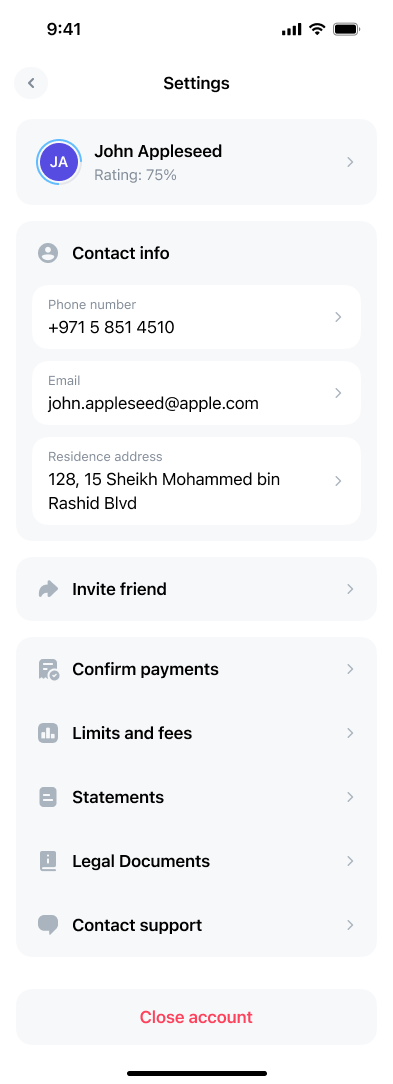 2. If cards are linked to the account, the user must either close them or transfer them to other accounts before closure.
3. The remaining balance of the account being closed is subject to return to the wallet from which the account creation process was carried out. The address of the corresponding wallet is displayed on the account page in the "Linked to" information block.
# Account Funding
To use the main features of the service, users need to fund their [smart contract](https://whales.enterprise.slack.com/docs/T045HLK3YLE/F09FGC4GU02), which acts as a bank account. User [bank cards](https://whales.enterprise.slack.com/docs/T045HLK3YLE/F09FE5D3DLM) are linked to the smart contract for making payments. When paying with [a bank card](https://whales.enterprise.slack.com/docs/T045HLK3YLE/F09FE5D3DLM), funds are debited from the user's account to which the card is attached.
# Account Funding Methods
1. **From savings account (from connected wallet balance)** - allows transferring funds from the connected wallet to the account.
2. **From another wallet** — provides the ability to fund the account in a currency different from the account currency, with automatic currency conversion.
3. **Deposit by details (direct funding)** — provides the ability to transfer funds to the account from any source using the account details.
4. **From exchange** — enables transferring funds to the account balance from an exchange balance.
In the Holders + Tonhub system, the following terminology is used for accounts:
* **Spending accounts** - accounts in Holders designed for linking cards and making purchases
* **Savings accounts** - balances of the connected wallet in various currencies, used for storing funds
# Gas Fees for Account Funding
Gas fees (commission) for account funding consist of two main parts:
1. Gas for sending the funding transaction - any transaction on the blockchain requires paying a network fee. Paid by the user.
2. Gas for updating the contract balance. To recognize funds received on the contract balance, a Controller is used that continuously scans all transactions on the blockchain. When a transaction sent to a Holders account address is detected, the Controller initiates an update of the corresponding contract balance. Paid by Holders.
The gas amount will vary depending on the blockchain and the method of contract funding.
## Fee Amounts
1. Commission for conducting the funding transaction:
1. **TON** - approximately **0.03 TON**
2. **Solana** - **0.000005 SOL**
2. Commission for updating the contract balance:
1. **TON** - approximately **0.1 TON** (paid by Holders)
2. **Solana** - **not charged**
Note: maximum commission values are indicated. The actual commission may be lower - in this case, the unused portion is returned to the user's wallet balance.
## Funding from Savings Account
The simplest way to fund an account. This function is available when there is a positive balance in the savings account in the corresponding currency. The user specifies the required amount and confirms the funding operation. Funds are credited to the account within a few minutes.
## Funding from Another Wallet
This funding method works through the partner service [Changelly](https://changelly.com/). It allows you to fund your account with cryptocurrencies that are not directly supported by the platform:
* **USDT (TRC-20)**
* **USDT (Polygon)**
* **USDT (SOL)**
* **USDT (ERC-20)**
* **USDC (Polygon)**
* **USDC (ERC-20)**
* **USDC (SOL) for contracts on the TON blockchain**
**How it works:** the user sends funds in one of the listed currencies to a [Changelly](https://changelly.com/) address, and they automatically convert and credit the money to the account in the required currency. This is especially convenient for using cryptocurrencies that are restricted by [MICA regulations](https://eur-lex.europa.eu/legal-content/EN/TXT/?uri=CELEX:32023R1114) (for example, [USDT](https://tether.to/)). Holders covers the exchange commission. Funding this way typically takes up to 60 minutes.\
As part of the integration with Holders, [Changelly](https://changelly.com/) supports exchanges exclusively at a fixed rate (Fix rate). With this exchange method, the rate is fixed for a certain period, allowing the client to know exactly the final amount. 3 hours are provided to complete the operation. This approach became possible because exchanges are only made between stable currencies.
### Interface
1. The user selects the currency in which they want to fund the account.
2. If cards are linked to the account, the user must either close them or transfer them to other accounts before closure.
3. The remaining balance of the account being closed is subject to return to the wallet from which the account creation process was carried out. The address of the corresponding wallet is displayed on the account page in the "Linked to" information block.
# Account Funding
To use the main features of the service, users need to fund their [smart contract](https://whales.enterprise.slack.com/docs/T045HLK3YLE/F09FGC4GU02), which acts as a bank account. User [bank cards](https://whales.enterprise.slack.com/docs/T045HLK3YLE/F09FE5D3DLM) are linked to the smart contract for making payments. When paying with [a bank card](https://whales.enterprise.slack.com/docs/T045HLK3YLE/F09FE5D3DLM), funds are debited from the user's account to which the card is attached.
# Account Funding Methods
1. **From savings account (from connected wallet balance)** - allows transferring funds from the connected wallet to the account.
2. **From another wallet** — provides the ability to fund the account in a currency different from the account currency, with automatic currency conversion.
3. **Deposit by details (direct funding)** — provides the ability to transfer funds to the account from any source using the account details.
4. **From exchange** — enables transferring funds to the account balance from an exchange balance.
In the Holders + Tonhub system, the following terminology is used for accounts:
* **Spending accounts** - accounts in Holders designed for linking cards and making purchases
* **Savings accounts** - balances of the connected wallet in various currencies, used for storing funds
# Gas Fees for Account Funding
Gas fees (commission) for account funding consist of two main parts:
1. Gas for sending the funding transaction - any transaction on the blockchain requires paying a network fee. Paid by the user.
2. Gas for updating the contract balance. To recognize funds received on the contract balance, a Controller is used that continuously scans all transactions on the blockchain. When a transaction sent to a Holders account address is detected, the Controller initiates an update of the corresponding contract balance. Paid by Holders.
The gas amount will vary depending on the blockchain and the method of contract funding.
## Fee Amounts
1. Commission for conducting the funding transaction:
1. **TON** - approximately **0.03 TON**
2. **Solana** - **0.000005 SOL**
2. Commission for updating the contract balance:
1. **TON** - approximately **0.1 TON** (paid by Holders)
2. **Solana** - **not charged**
Note: maximum commission values are indicated. The actual commission may be lower - in this case, the unused portion is returned to the user's wallet balance.
## Funding from Savings Account
The simplest way to fund an account. This function is available when there is a positive balance in the savings account in the corresponding currency. The user specifies the required amount and confirms the funding operation. Funds are credited to the account within a few minutes.
## Funding from Another Wallet
This funding method works through the partner service [Changelly](https://changelly.com/). It allows you to fund your account with cryptocurrencies that are not directly supported by the platform:
* **USDT (TRC-20)**
* **USDT (Polygon)**
* **USDT (SOL)**
* **USDT (ERC-20)**
* **USDC (Polygon)**
* **USDC (ERC-20)**
* **USDC (SOL) for contracts on the TON blockchain**
**How it works:** the user sends funds in one of the listed currencies to a [Changelly](https://changelly.com/) address, and they automatically convert and credit the money to the account in the required currency. This is especially convenient for using cryptocurrencies that are restricted by [MICA regulations](https://eur-lex.europa.eu/legal-content/EN/TXT/?uri=CELEX:32023R1114) (for example, [USDT](https://tether.to/)). Holders covers the exchange commission. Funding this way typically takes up to 60 minutes.\
As part of the integration with Holders, [Changelly](https://changelly.com/) supports exchanges exclusively at a fixed rate (Fix rate). With this exchange method, the rate is fixed for a certain period, allowing the client to know exactly the final amount. 3 hours are provided to complete the operation. This approach became possible because exchanges are only made between stable currencies.
### Interface
1. The user selects the currency in which they want to fund the account.
.jpg?fit=max&auto=format&n=5wXm9PjfIP9qNCh-&q=85&s=cc68d41018d3260a4c90766b2c622e66 "2025 10 2117 58 08(1)") 2. The user enters the desired top-up amount and confirms the exchange.
2. The user enters the desired top-up amount and confirms the exchange.
.jpg?fit=max&auto=format&n=5wXm9PjfIP9qNCh-&q=85&s=3c35620c31fc040e98bb6ed35082d02d "2025 10 2117 58 12(1)") 3. [Changelly](https://changelly.com/) creates an exchange order and awaits transfer from the user.
3. [Changelly](https://changelly.com/) creates an exchange order and awaits transfer from the user.
.jpg?fit=max&auto=format&n=5wXm9PjfIP9qNCh-&q=85&s=9c6b98b04c548eecf919862d89952847 "2025 10 2117 58 14(1)") 4. The user transfers funds to the details specified in the order.
5. After receiving funds from the user, the [Changelly](https://changelly.com/) service credits the corresponding amount to their account in the Holders system.
## Deposit by Details (Direct Funding)
This method involves direct transfer of funds to the contract address from another address in the same network. It is only supported on newer contract versions:
* **USDC (supported on all versions)**
* **TON (starting from version v3)**
* **USDT (TON) (starting from version v8)**
With direct funding, funds are received directly to the contract address. To recognize received funds, a Controller is used that continuously scans all transactions on the blockchain. When a transaction sent to a Holders account address is detected, the Controller initiates an update of the corresponding contract balance.\
Deposit by details is the classic direct account funding via transaction to its address. It allows you to fund an account, share account details, or create a payment link for account funding and send it to a friend who can fund the account through the [Changelly](https://changelly.com/) interface regardless of whether they have a Holders service account.
* Fund the account directly using details
* Share account details with other users
* Create a payment link like [https://hldrs.me/th/pay/cmgzamplv39rk3s3gkj2mia1x](https://hldrs.me/th/pay/cmgzamplv39rk3s3gkj2mia1x) for funding and send it to another user
When using the payment link, the recipient can fund the account through the [Changelly](https://changelly.com/) interface without needing to create an account in the Holders service.
## Funding from Exchange
This method represents an adapted version of funding by details specifically designed for cryptocurrency exchanges. The user interface provides step-by-step instructions for transferring funds from the most popular cryptocurrency trading platforms. The user selects the corresponding exchange and, following the provided instructions, completes the account funding procedure.
Exchanges for which separate instructions are provided:
* **Binance**
* **OKX**
* **Bitget**
* **Gate.io**
* **Kucoin**
* **Kraken**
* **Bybit**
# Account Withdrawal
Funds withdrawal is carried out through three possible methods:
* To savings account - to the balance of the wallet linked to Holders.
* To another wallet - to an arbitrary address.
* Holders account - to another account in the Holders system.
## To Savings Account
This withdrawal mechanism provides a high level of security and non-custodial nature, since funds transfer is carried out exclusively to a pre-authorized client address, and is gas-free for the user, as the transaction is signed and paid for by the Holders service [controller](https://whales.enterprise.slack.com/docs/T045HLK3YLE/F09FGC4GU02). Thus, the [Holders smart contract](https://whales.enterprise.slack.com/docs/T045HLK3YLE/F09FGC4GU02) performs withdrawal of funds to the client's wallet without requiring additional permission or signature from the account owner.
## To Another Wallet
If the controller can withdraw money from an account to any address, this violates the agreement between Holders and the client. It turns out that the controller can take money from any account without the owner's permission. This makes the [Holders smart contract](https://whales.enterprise.slack.com/docs/T045HLK3YLE/F09FGC4GU02) centralized and unsafe. Auditors and users can rightfully say that the controller (managed by Holders) can steal all money from all accounts. To avoid this, multi-signature is used.\
Multi-signature is when an operation requires signatures from both the client and Holders. This provides:
* The client personally authorizes all withdrawals from their account to external addresses
* Holders verifies all withdrawals for compliance with AML/KYT requirements and other rules
* Holders pays transaction fees instead of the client
This method maintains security and allows safe withdrawal of money to external addresses.
### Withdrawal to Other Blockchains
To enable money withdrawal to different networks, [Changelly](https://changelly.com/) is integrated into the system (as with funding). [Changelly ](https://changelly.com/)allows the user to choose the network in which they want to receive money. The user selects the network, specifies the recipient address, and confirms the transfer. Gas for the operation is paid by Holders.
## To Another Holders Account
This method allows withdrawals/transfers of funds to other Holders accounts by phone number or email. An important condition is that the recipient's account must pre-approve incoming transfers by clicking the corresponding button on the main page.
# Payments
The following types of payments are available:
* **Holders Account** - to another account in the Holders system. This transfer was discussed above in the Account Withdrawal section.
* **External Wallet** - to an arbitrary address. This transfer was discussed above in the Account Withdrawal section.
* **SEPA** - bank transfers in EUR within Europe.
* **SWIFT** - international bank transfers in any currency.
## SEPA
A SEPA transfer is a cashless bank transfer in euros between SEPA zone countries (EU, EEA and others), which follows unified standards: fast, with fixed commission and without currency conversion.\
SEPA transfers in the Holders system are processed by [support service](https://help.holders.io/en/) agents manually through the [Triple-A](https://www.triple-a.io/) payment partner. To initiate a transfer, the transfer amount and commission for its processing must be available on the client's account. Currently, Holders does not have a direct SEPA transfer sending function implemented — all operations are carried out through the [Triple-A](https://www.triple-a.io/) payment partner. The transfer takes from 1 business day.
### Recipient Data
* Full name of the recipient according to banking documents
* Recipient's IBAN
* BIC/SWIFT code of the recipient's bank (if necessary)
* Payment reference
* Amount in EUR
### Tariff
A standard commission is charged for processing a SEPA payment, consisting of a fixed amount and a percentage of the total transfer amount. The commission for sending SEPA payments is 3.5 USD plus 1.5% of the total payment amount, including the fixed commission. This means that when sending a larger amount, the percentage part of the commission will grow proportionally.
## SWIFT
A SWIFT transfer is an international bank transfer through the SWIFT network, allowing money to be sent to any country and currency, but usually with higher commission, possible conversion and longer timeframes than SEPA. Timeframes: usually from 1 to 5 business days.\
SWIFT transfers in the Holders system are processed by [support service](https://help.holders.io/en/) agents manually through the [Triple-A](https://www.triple-a.io/) payment partner. To initiate a transfer, the transfer amount and commission for its processing must be available on the client's account. Currently, Holders does not have a direct SWIFT transfer sending function implemented — all operations are carried out through the [Triple-A ](https://www.triple-a.io/)payment partner.
### Sending Data
Individual Particulars:
* **First Name**
* **Last Name**
* **Gender**
* **Date of Birth**
* **Email address**
* **Contact number (Mobile)**
* **Occupation**
* **Country of residence**
* **Address**
* **Zip code**
* **City**
* **Province / state**
Identification:
* **ID type**
* **ID number**
* **Nationality**
* **Issuing country**
* **Issue Date**
* **Expiry Date**
### Tariff
The commission for a SWIFT payment consists of:
* Fixed part: 50 USD
* Percentage part: 2.3% of the transfer amount (0.8% + 1.5%)
The total commission is calculated as: 50 USD + 2.3% of the transfer amount.\
When sending a SWIFT payment, you can choose one of two ways to pay commissions:\
**SHA (Shared) - Shared payment:**
* Commissions are divided between sender and recipient
* The recipient may receive a smaller amount due to deductions by intermediary banks
* Suitable when the sender wants to save on expenses
**OUR - Full payment by sender:**
* The sender pays all commissions of intermediary banks
* The recipient receives exactly the specified amount without deductions
* Additional fixed fee: 25 USD
* Suitable when it's important that the recipient receives the full amount
# Setting Blockchain Limits
The user has the ability to set restrictions on account spending, which are fixed at the blockchain level. The system supports three main types of limits:
* **Limit per individual transaction**
* **Daily spending limit**
* **Monthly spending limit**
Limits are set individually for each account. Detailed information about the functioning of limits is presented in [the corresponding document](/Issuerblockchainlimits).
# Changing Account Name
The user can change the account name displayed in the interface at any time by following these steps:
1. Select the account whose name the user wants to change
2. Click on its title in the upper part of the interface
3. Enter the desired name (name length is limited to 50 characters)
4. Save the name
This documentation is built and hosted on [Mintlify](https://mintlify.com), a developer documentation platform.
4. The user transfers funds to the details specified in the order.
5. After receiving funds from the user, the [Changelly](https://changelly.com/) service credits the corresponding amount to their account in the Holders system.
## Deposit by Details (Direct Funding)
This method involves direct transfer of funds to the contract address from another address in the same network. It is only supported on newer contract versions:
* **USDC (supported on all versions)**
* **TON (starting from version v3)**
* **USDT (TON) (starting from version v8)**
With direct funding, funds are received directly to the contract address. To recognize received funds, a Controller is used that continuously scans all transactions on the blockchain. When a transaction sent to a Holders account address is detected, the Controller initiates an update of the corresponding contract balance.\
Deposit by details is the classic direct account funding via transaction to its address. It allows you to fund an account, share account details, or create a payment link for account funding and send it to a friend who can fund the account through the [Changelly](https://changelly.com/) interface regardless of whether they have a Holders service account.
* Fund the account directly using details
* Share account details with other users
* Create a payment link like [https://hldrs.me/th/pay/cmgzamplv39rk3s3gkj2mia1x](https://hldrs.me/th/pay/cmgzamplv39rk3s3gkj2mia1x) for funding and send it to another user
When using the payment link, the recipient can fund the account through the [Changelly](https://changelly.com/) interface without needing to create an account in the Holders service.
## Funding from Exchange
This method represents an adapted version of funding by details specifically designed for cryptocurrency exchanges. The user interface provides step-by-step instructions for transferring funds from the most popular cryptocurrency trading platforms. The user selects the corresponding exchange and, following the provided instructions, completes the account funding procedure.
Exchanges for which separate instructions are provided:
* **Binance**
* **OKX**
* **Bitget**
* **Gate.io**
* **Kucoin**
* **Kraken**
* **Bybit**
# Account Withdrawal
Funds withdrawal is carried out through three possible methods:
* To savings account - to the balance of the wallet linked to Holders.
* To another wallet - to an arbitrary address.
* Holders account - to another account in the Holders system.
## To Savings Account
This withdrawal mechanism provides a high level of security and non-custodial nature, since funds transfer is carried out exclusively to a pre-authorized client address, and is gas-free for the user, as the transaction is signed and paid for by the Holders service [controller](https://whales.enterprise.slack.com/docs/T045HLK3YLE/F09FGC4GU02). Thus, the [Holders smart contract](https://whales.enterprise.slack.com/docs/T045HLK3YLE/F09FGC4GU02) performs withdrawal of funds to the client's wallet without requiring additional permission or signature from the account owner.
## To Another Wallet
If the controller can withdraw money from an account to any address, this violates the agreement between Holders and the client. It turns out that the controller can take money from any account without the owner's permission. This makes the [Holders smart contract](https://whales.enterprise.slack.com/docs/T045HLK3YLE/F09FGC4GU02) centralized and unsafe. Auditors and users can rightfully say that the controller (managed by Holders) can steal all money from all accounts. To avoid this, multi-signature is used.\
Multi-signature is when an operation requires signatures from both the client and Holders. This provides:
* The client personally authorizes all withdrawals from their account to external addresses
* Holders verifies all withdrawals for compliance with AML/KYT requirements and other rules
* Holders pays transaction fees instead of the client
This method maintains security and allows safe withdrawal of money to external addresses.
### Withdrawal to Other Blockchains
To enable money withdrawal to different networks, [Changelly](https://changelly.com/) is integrated into the system (as with funding). [Changelly ](https://changelly.com/)allows the user to choose the network in which they want to receive money. The user selects the network, specifies the recipient address, and confirms the transfer. Gas for the operation is paid by Holders.
## To Another Holders Account
This method allows withdrawals/transfers of funds to other Holders accounts by phone number or email. An important condition is that the recipient's account must pre-approve incoming transfers by clicking the corresponding button on the main page.
# Payments
The following types of payments are available:
* **Holders Account** - to another account in the Holders system. This transfer was discussed above in the Account Withdrawal section.
* **External Wallet** - to an arbitrary address. This transfer was discussed above in the Account Withdrawal section.
* **SEPA** - bank transfers in EUR within Europe.
* **SWIFT** - international bank transfers in any currency.
## SEPA
A SEPA transfer is a cashless bank transfer in euros between SEPA zone countries (EU, EEA and others), which follows unified standards: fast, with fixed commission and without currency conversion.\
SEPA transfers in the Holders system are processed by [support service](https://help.holders.io/en/) agents manually through the [Triple-A](https://www.triple-a.io/) payment partner. To initiate a transfer, the transfer amount and commission for its processing must be available on the client's account. Currently, Holders does not have a direct SEPA transfer sending function implemented — all operations are carried out through the [Triple-A](https://www.triple-a.io/) payment partner. The transfer takes from 1 business day.
### Recipient Data
* Full name of the recipient according to banking documents
* Recipient's IBAN
* BIC/SWIFT code of the recipient's bank (if necessary)
* Payment reference
* Amount in EUR
### Tariff
A standard commission is charged for processing a SEPA payment, consisting of a fixed amount and a percentage of the total transfer amount. The commission for sending SEPA payments is 3.5 USD plus 1.5% of the total payment amount, including the fixed commission. This means that when sending a larger amount, the percentage part of the commission will grow proportionally.
## SWIFT
A SWIFT transfer is an international bank transfer through the SWIFT network, allowing money to be sent to any country and currency, but usually with higher commission, possible conversion and longer timeframes than SEPA. Timeframes: usually from 1 to 5 business days.\
SWIFT transfers in the Holders system are processed by [support service](https://help.holders.io/en/) agents manually through the [Triple-A](https://www.triple-a.io/) payment partner. To initiate a transfer, the transfer amount and commission for its processing must be available on the client's account. Currently, Holders does not have a direct SWIFT transfer sending function implemented — all operations are carried out through the [Triple-A ](https://www.triple-a.io/)payment partner.
### Sending Data
Individual Particulars:
* **First Name**
* **Last Name**
* **Gender**
* **Date of Birth**
* **Email address**
* **Contact number (Mobile)**
* **Occupation**
* **Country of residence**
* **Address**
* **Zip code**
* **City**
* **Province / state**
Identification:
* **ID type**
* **ID number**
* **Nationality**
* **Issuing country**
* **Issue Date**
* **Expiry Date**
### Tariff
The commission for a SWIFT payment consists of:
* Fixed part: 50 USD
* Percentage part: 2.3% of the transfer amount (0.8% + 1.5%)
The total commission is calculated as: 50 USD + 2.3% of the transfer amount.\
When sending a SWIFT payment, you can choose one of two ways to pay commissions:\
**SHA (Shared) - Shared payment:**
* Commissions are divided between sender and recipient
* The recipient may receive a smaller amount due to deductions by intermediary banks
* Suitable when the sender wants to save on expenses
**OUR - Full payment by sender:**
* The sender pays all commissions of intermediary banks
* The recipient receives exactly the specified amount without deductions
* Additional fixed fee: 25 USD
* Suitable when it's important that the recipient receives the full amount
# Setting Blockchain Limits
The user has the ability to set restrictions on account spending, which are fixed at the blockchain level. The system supports three main types of limits:
* **Limit per individual transaction**
* **Daily spending limit**
* **Monthly spending limit**
Limits are set individually for each account. Detailed information about the functioning of limits is presented in [the corresponding document](/Issuerblockchainlimits).
# Changing Account Name
The user can change the account name displayed in the interface at any time by following these steps:
1. Select the account whose name the user wants to change
2. Click on its title in the upper part of the interface
3. Enter the desired name (name length is limited to 50 characters)
4. Save the name
This documentation is built and hosted on [Mintlify](https://mintlify.com), a developer documentation platform.