> ## Documentation Index
> Fetch the complete documentation index at: https://whalescorp.mintlify.site/llms.txt
> Use this file to discover all available pages before exploring further.
# Deposit/withdraw via tonwhales.com
# What is [tonwhales.com](http://tonwhales.com)
The [tonwhales.com](http://tonwhales.com) website provides a [web interface for staking](https://tonwhales.com/staking) and [TON](https://ton.org/) token analytics across all Ton Whales pools, requiring no additional software installation. The site supports direct wallet connection through [TON Connect 2.0](https://docs.ton.org/develop/dapps/ton-connect/overview) technology.\
The site contains the following sections:
* Staking — information about all active staking pools, interface for sending and withdrawing stakes, holder rankings across various pools.
* Validator statistics — current information about the current composition of TON validators.
* Pool comparison — ability to compare different pools by profitability.
* Explorer — tool for monitoring transactions in the [TON blockchain](https://ton.org/).
* Tonhub — section with useful utilities for the Tonhub wallet.
* Club — section dedicated to the [whale NFT club](https://getgems.io/collection/EQDvRFMYLdxmvY3Tk-cfWMLqDnXF_EclO2Fp4wwj33WhlNFT).
* Staking — information about all active staking pools, interface for sending and withdrawing stakes, holder rankings across various pools.
* Validator statistics — current information about the current composition of TON validators.
* Pool comparison — ability to compare different pools by profitability.
* Explorer — tool for monitoring transactions in the TON blockchain.
* Tonhub — section with useful utilities for the Tonhub wallet.
* Club — section dedicated to the whale NFT club.
# Pools on [tonwhales.com](http://tonwhales.com)
* **Nominators** - [First proprietary pool](https://tonwhales.com/staking/pool/nominators). Technical support for the pool infrastructure is provided by the Whales team. The pool operates in open mode and is available to all users. Pool commission is 25%.
* **Club** - Private pool for holders of [whale NFTs](https://getgems.io/collection/EQDvRFMYLdxmvY3Tk-cfWMLqDnXF_EclO2Fp4wwj33WhlNFT). Commission is 18%.
* **Tonkeeper** - Partner pool with [non-custodial Tonkeeper wallet](https://tonkeeper.com/). Open access, commission is 25%.
* **Whales Liquid** - Liquid pool that issues wsTON tokens instead of locking funds. The wsTON rate grows proportionally to staking profitability.
* **Team** - Private pool for the Whales team and top-15 NFT club participants. Commission is 5%.
* **P2P** - Open pool launched in partnership with international staking provider [P2P.org](http://P2P.org). Pool commission is 15%.
* **Ledger** - Open pool launched in partnership with [Ledger](https://www.ledger.com/) cold wallet. Pool commission is 20%.
# Requirements before starting
1. The minimum amount for sending funds is 50 TON for all Ton Whales poola and 10 for P2P & Ledger, except for the liquid pool, for which the minimum amount is 1 TON.
2. Tonhub wallet must be installed on your mobile device.
3. It is necessary to ensure in advance that you have funds to pay the commission for withdrawing funds. The total gas cost for a withdrawal operation can reach 0.4 TON — it is recommended to reserve this amount on your wallet balance.
4. A withdrawal request can only be made from the wallet address from which the stake was sent. In case of loss of access to the wallet, fund recovery will be impossible.
5. Sending funds from custodial wallets or cryptocurrency exchanges is strictly prohibited. If this requirement is violated, funds will be irretrievably lost.
# When rewards are credited
Rewards are credited to the staking balance upon completion of each full cycle in which your funds participated.\
**Example of crediting time calculation:**\
If you send funds to staking on the 1st day, and the current staking cycle ends on the 2nd day at 18:00, then:
* Your funds will be accepted by the pool and begin participating in staking from the 2nd day at 18:00
* The first profit crediting will occur at the end of the next full cycle — on the 4th day at 06:00 (36 hours after starting participation in staking)
# Deposit via website
1. Go to [the staking page](https://tonwhales.com/staking) and select the pool you want to send funds to by clicking on its image. Note that Team and Club pools have restrictions, please review them before sending funds to these pools.
2. If you are using a mobile wallet that supports TON Connect, you can connect it to the site by clicking the Connect wallet button. This will simplify the process of sending funds.
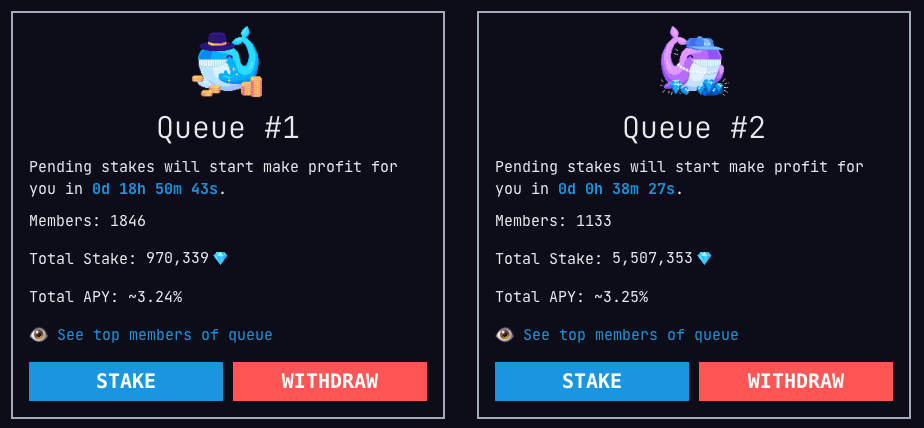
3. Select one of the pool queues and click Stake. Compare the yield of the queues, and if it's the same, choose the one where the staking cycle will end sooner — this way you'll start earning profit earlier. More about queues.
4. Enter the amount you want to send to staking and select the transaction method:
 ***
***
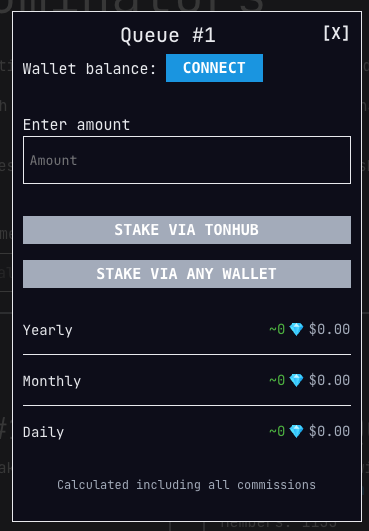 * **Via Tonhub.** If you didn't connect your wallet in step 2, scan the QR code with the camera inside Tonhub. You'll only need to confirm sending coins to staking. Note that you need to pay gas (commission) for sending coins to staking in the amount of 0.2 TON. The remaining commission will be returned after sending. The pool will automatically leave 0.2 TON on your balance, which you can use to make withdrawals. Coins will start participating in staking after the current cycle ends. Profit will be credited to the staking balance at the end of each full cycle. Thus, the first profit will appear on the staking balance after the time remaining until the end of the current cycle, plus one full cycle (36 hours).
* **Via another wallet.** This method allows you to send coins to staking from any non-custodial wallet that supports TON.
1. Click on the Stake via any wallet button
* **Via Tonhub.** If you didn't connect your wallet in step 2, scan the QR code with the camera inside Tonhub. You'll only need to confirm sending coins to staking. Note that you need to pay gas (commission) for sending coins to staking in the amount of 0.2 TON. The remaining commission will be returned after sending. The pool will automatically leave 0.2 TON on your balance, which you can use to make withdrawals. Coins will start participating in staking after the current cycle ends. Profit will be credited to the staking balance at the end of each full cycle. Thus, the first profit will appear on the staking balance after the time remaining until the end of the current cycle, plus one full cycle (36 hours).
* **Via another wallet.** This method allows you to send coins to staking from any non-custodial wallet that supports TON.
1. Click on the Stake via any wallet button
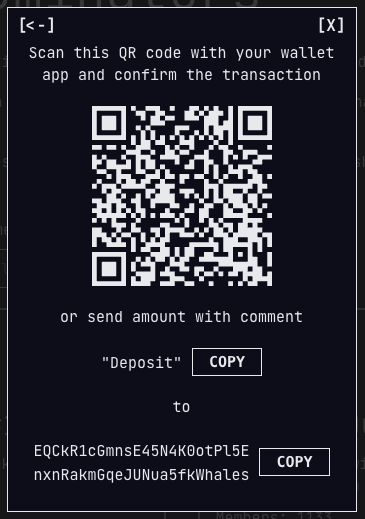 2. Copy the pool address or scan the QR code in your wallet application
3. Send coins to the specified address with the comment (memo) Deposit. Note that you need to pay gas (fee) for sending coins to staking in the amount of 0.2 TON. The remaining fee will be returned after sending.
4. In the response transaction, you will receive a message that the stake has been accepted. If the stake was not accepted, check the comment you specified — it should be written with a capital letter and without extra spaces.
The liquid pool operates somewhat differently from classic pools. Read more about it in the [Whales Liquid](/liquid-staking-pool) section.
# Withdrawal via [tonwhales.com](http://tonwhales.com)
1. Go to [the staking section](https://tonwhales.com/staking) of the [tonwhales.com](http://tonwhales.com) website
2. If you are using a mobile wallet that supports TON Connect, you can connect it to the site by clicking the Connect wallet button. This will simplify the withdrawal process, as the site will immediately show which pool your funds are in.
3. Select the pool and queue from which you want to withdraw funds.
4. Click the Withdraw button
5. Enter the amount you want to withdraw. For withdrawal, as with deposits, there are two options available:
2. Copy the pool address or scan the QR code in your wallet application
3. Send coins to the specified address with the comment (memo) Deposit. Note that you need to pay gas (fee) for sending coins to staking in the amount of 0.2 TON. The remaining fee will be returned after sending.
4. In the response transaction, you will receive a message that the stake has been accepted. If the stake was not accepted, check the comment you specified — it should be written with a capital letter and without extra spaces.
The liquid pool operates somewhat differently from classic pools. Read more about it in the [Whales Liquid](/liquid-staking-pool) section.
# Withdrawal via [tonwhales.com](http://tonwhales.com)
1. Go to [the staking section](https://tonwhales.com/staking) of the [tonwhales.com](http://tonwhales.com) website
2. If you are using a mobile wallet that supports TON Connect, you can connect it to the site by clicking the Connect wallet button. This will simplify the withdrawal process, as the site will immediately show which pool your funds are in.
3. Select the pool and queue from which you want to withdraw funds.
4. Click the Withdraw button
5. Enter the amount you want to withdraw. For withdrawal, as with deposits, there are two options available:
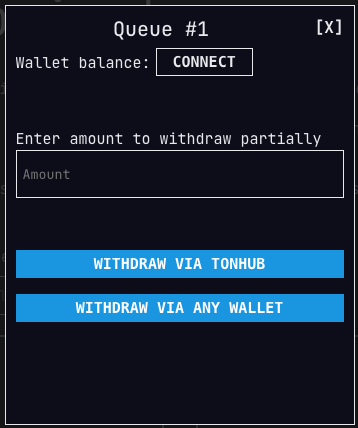 * **Via Tonhub.** If you didn't connect your wallet in step 2, scan the QR code with the camera inside Tonhub. You'll only need to confirm sending the withdrawal request. Note that you need to pay gas (fee) for withdrawing coins in the amount of 0.2 TON.
* **Via another wallet.**
* Click the Withdraw via any wallet button.
* Copy the pool address or scan the QR code in your wallet application
* Send a transaction to the pool address with the comment (memo) Withdraw.
* You have created a withdrawal request. It needs to be repeated after the end of the nearest staking cycle. Funds will arrive in your wallet balance within a couple of minutes.
# Cooldown period
During the first two hours of each staking cycle, a simplified period (cooldown) is active — a period in which validators are in a waiting state. During this time interval, users can perform deposit and withdrawal operations instantly, without needing to wait for the cycle to complete. When the cooldown period is active in both pools, users have the ability to transfer funds between pools without losing income for the current cycle. Additionally, withdrawal operations during the cooldown period are executed in one transaction instead of the standard two operations.
This documentation is built and hosted on [Mintlify](https://mintlify.com), a developer documentation platform.
* **Via Tonhub.** If you didn't connect your wallet in step 2, scan the QR code with the camera inside Tonhub. You'll only need to confirm sending the withdrawal request. Note that you need to pay gas (fee) for withdrawing coins in the amount of 0.2 TON.
* **Via another wallet.**
* Click the Withdraw via any wallet button.
* Copy the pool address or scan the QR code in your wallet application
* Send a transaction to the pool address with the comment (memo) Withdraw.
* You have created a withdrawal request. It needs to be repeated after the end of the nearest staking cycle. Funds will arrive in your wallet balance within a couple of minutes.
# Cooldown period
During the first two hours of each staking cycle, a simplified period (cooldown) is active — a period in which validators are in a waiting state. During this time interval, users can perform deposit and withdrawal operations instantly, without needing to wait for the cycle to complete. When the cooldown period is active in both pools, users have the ability to transfer funds between pools without losing income for the current cycle. Additionally, withdrawal operations during the cooldown period are executed in one transaction instead of the standard two operations.
This documentation is built and hosted on [Mintlify](https://mintlify.com), a developer documentation platform.