> ## Documentation Index
> Fetch the complete documentation index at: https://whalescorp.mintlify.site/llms.txt
> Use this file to discover all available pages before exploring further.
# Deposit/withdraw via Tonkeeper
# What is Tonkeeper
[Tonkeeper](https://tonkeeper.com/) is a mobile non-custodial cryptocurrency wallet designed to work with the [TON (The Open Network)](https://ton.org/en) blockchain and [Tron (supports only USDT (TRC-20))](https://tron.network/).\
Tonkeeper supports a single Ton Whales pool - [Tonkeeper](https://whales.enterprise.slack.com/docs/T045HLK3YLE/F0A5N1EP20Z?focus_section_id=temp:C:YWX530129c3d2cd42b29dd0100e4).
# Requirements before starting
1. The minimum amount for sending funds is 50 TON for all pools, except for the liquid pool, for which the minimum amount is 1 TON.
2. Tonkeeper must be installed on your mobile device.
3. It is necessary to ensure in advance that you have funds to pay the withdrawal fee. The total gas cost for a withdrawal operation can reach 0.4 TON — it is recommended to reserve this amount in your wallet balance.
4. A withdrawal request can only be made from the wallet address from which the stake was sent. In case of loss of access to the wallet, fund recovery will be impossible.
# When rewards are credited
Rewards are credited to the staking balance upon completion of each full cycle in which your funds participated.\
**Example of crediting time calculation:**\
If you send funds to staking on the 1st, and the current staking cycle ends on the 2nd at 18:00, then:
* Your funds will be accepted by the pool and start participating in staking from the 2nd at 18:00
* The first profit crediting will occur at the end of the next full cycle — on the 4th at 06:00 (36 hours after starting participation in staking)
# Deposit via Tonkeeper
1. On the main wallet page, press the Stake button
2. Enter the amount to send to staking and select the Ton Whales pool (Tonkeeper Queue 1 or 2). The minimum amount is 50 TON.
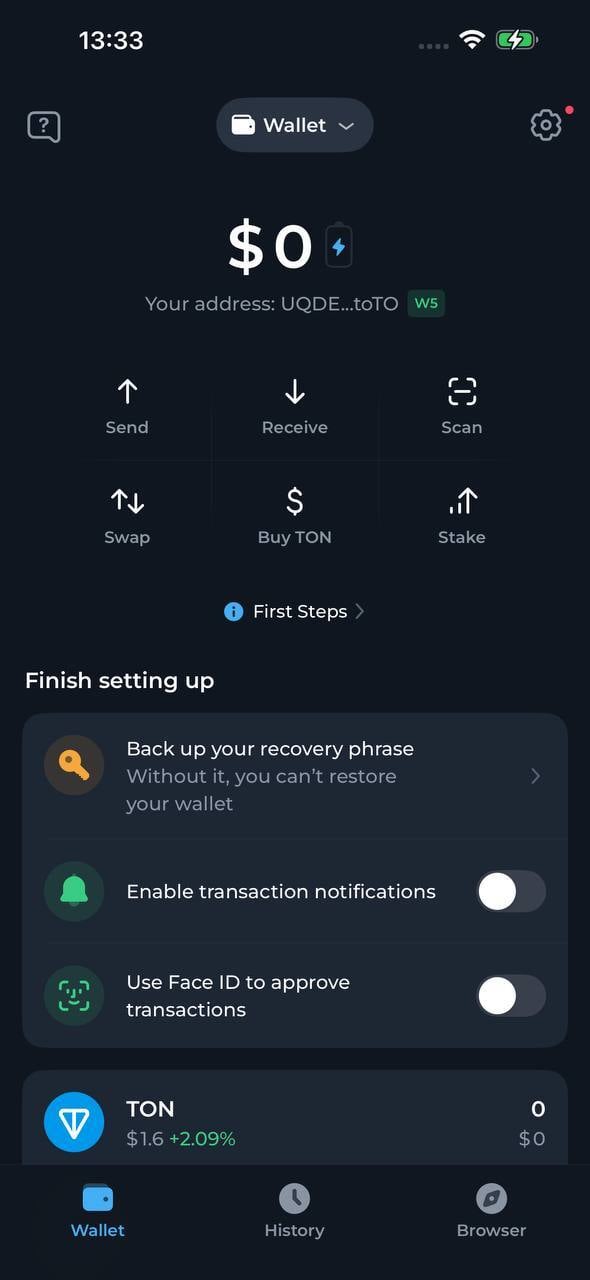 3. Confirm the operation. Note that you need to pay a commission for sending tokens to staking in the amount of 0.2 TON. The unused portion of the commission will be returned after the operation is completed. The wallet will automatically leave 0.2 TON on the balance to pay the commission for withdrawing funds.
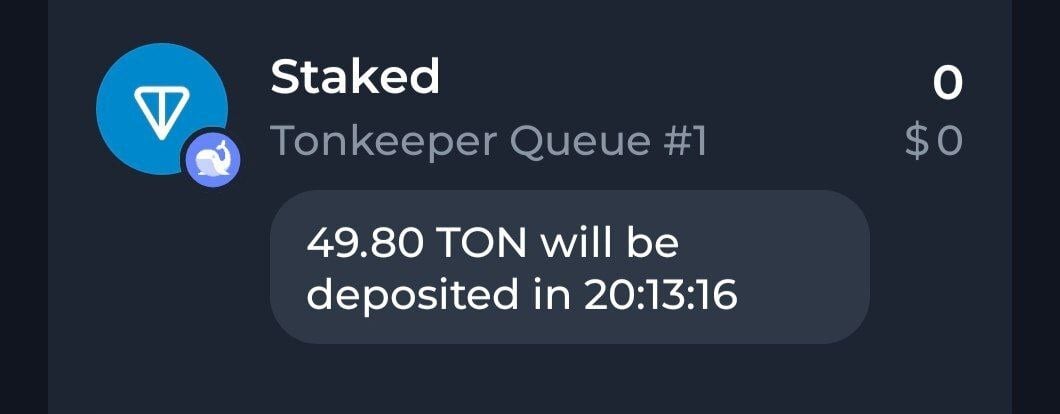
4. Your tokens will be displayed with the status "Pending deposit" and will start participating in staking after the current cycle is completed. Rewards are credited to the staking balance upon completion of each full cycle. The first profit accrual will occur after the remaining time until the end of the current cycle plus one full cycle (36 hours).
3. Confirm the operation. Note that you need to pay a commission for sending tokens to staking in the amount of 0.2 TON. The unused portion of the commission will be returned after the operation is completed. The wallet will automatically leave 0.2 TON on the balance to pay the commission for withdrawing funds.
4. Your tokens will be displayed with the status "Pending deposit" and will start participating in staking after the current cycle is completed. Rewards are credited to the staking balance upon completion of each full cycle. The first profit accrual will occur after the remaining time until the end of the current cycle plus one full cycle (36 hours).
 ***
***
 # Withdraw funds via Tonkeeper
1. On the wallet's main page, select the pool from which you need to withdraw funds and tap on it. Pools are displayed in the token list.
2. Tap the "Unstake" button.
3. Enter the amount you want to withdraw from staking.
4. Confirm the withdrawal operation. The system will create a request to withdraw tokens from staking. This operation charges a fee of 0.2 TON. The unused portion of the fee will be returned after the request is processed.
5. Upon completion of the current cycle, tokens will appear on the wallet's main screen with a status indicating they are ready for withdrawal. Tap on the corresponding tile and confirm the transaction to complete the withdrawal procedure.
6. Funds will arrive in your wallet balance within a few minutes.
This documentation is built and hosted on [Mintlify](https://mintlify.com), a developer documentation platform.
# Withdraw funds via Tonkeeper
1. On the wallet's main page, select the pool from which you need to withdraw funds and tap on it. Pools are displayed in the token list.
2. Tap the "Unstake" button.
3. Enter the amount you want to withdraw from staking.
4. Confirm the withdrawal operation. The system will create a request to withdraw tokens from staking. This operation charges a fee of 0.2 TON. The unused portion of the fee will be returned after the request is processed.
5. Upon completion of the current cycle, tokens will appear on the wallet's main screen with a status indicating they are ready for withdrawal. Tap on the corresponding tile and confirm the transaction to complete the withdrawal procedure.
6. Funds will arrive in your wallet balance within a few minutes.
This documentation is built and hosted on [Mintlify](https://mintlify.com), a developer documentation platform.