> ## Documentation Index
> Fetch the complete documentation index at: https://whalescorp.mintlify.site/llms.txt
> Use this file to discover all available pages before exploring further.
# Deposit/withdraw via Ledger
You can now stake your TON tokens directly through Ledger Live via the integrated [P2P.org](http://P2P.org) dApp. This allows you to earn rewards on your assets while maintaining full control and security using your Ledger device.
## Before you start
* Download and install the latest version of [Ledger Live](https://www.ledger.com/ledger-live) onto your computer or mobile device.
* Open Ledger Live, connect your Ledger device to the My Ledger section, and ensure your device is running the latest OS (firmware) version. Learn more [here](https://support.ledger.com/article/8458939792669-zd).
* Ensure the latest version of the Toncoin (TON) app is installed on your Ledger device.
## How to stake TON via Ledger Live
1. Open the Ledger Live app.
2. Click the Earn (%) icon in the left-hand menu.
3. View your options:
* Assets earning rewards: Track rewards on assets you’re already staking.
* Earn more rewards: See assets available for staking and estimated yields.
4. Click Earn more rewards.
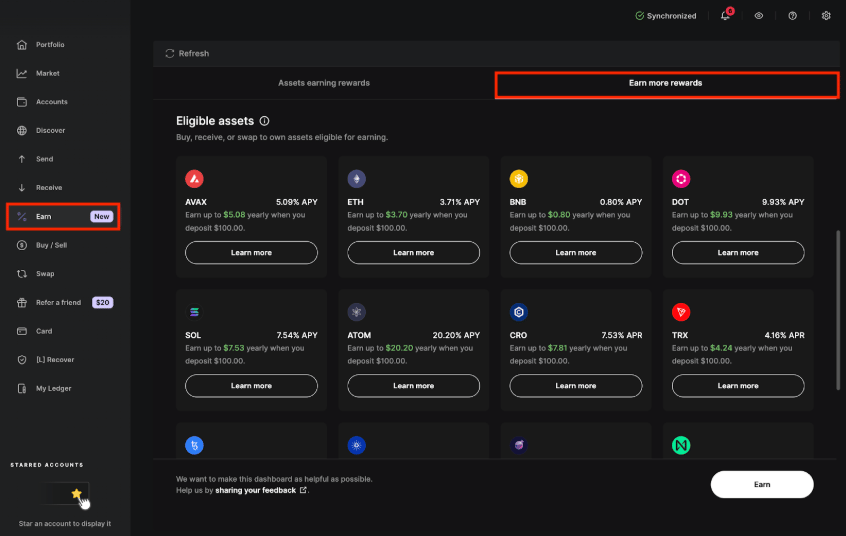 5. Select the account that holds your TON tokens. You’ll be redirected to the [P2P.org](http://P2P.org) dApp within Ledger Live.
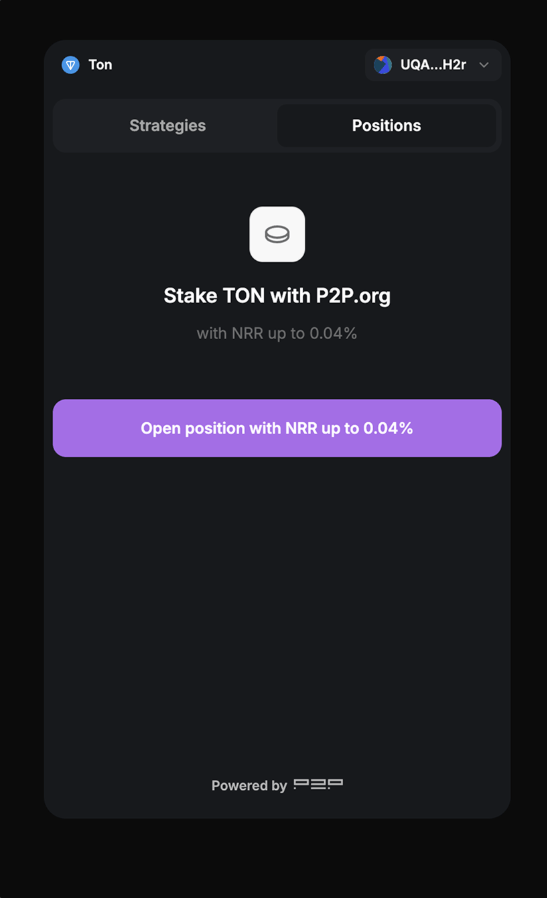 6. On the P2P interface, enter the amount of TON you want to stake.
7. Review the staking details, including estimated yield, lockup duration, and service fee.
6. On the P2P interface, enter the amount of TON you want to stake.
7. Review the staking details, including estimated yield, lockup duration, and service fee.
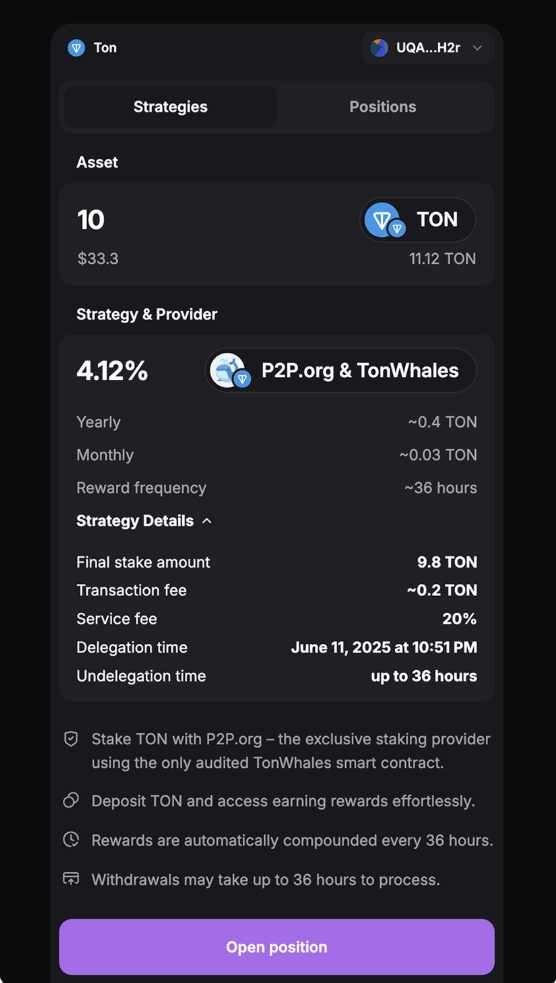 8. Click Open Position.
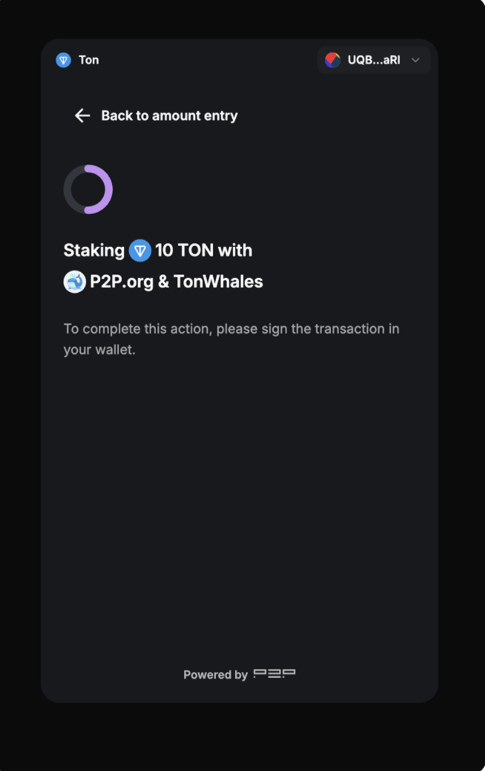
9. Use your Ledger device to approve and sign the transaction.
Once confirmed, you’ll be redirected to the Earn dashboard, where you can track your staked position under **Assets earning rewards**.
8. Click Open Position.
9. Use your Ledger device to approve and sign the transaction.
Once confirmed, you’ll be redirected to the Earn dashboard, where you can track your staked position under **Assets earning rewards**.
 ## Withdrawing your TON back to your available TON balance
You can track the status of your stake or withdraw it at any time you prefer. Follow the steps below:
1. On the Earn dashboard, next to your staked position, find the three dots and click **Manage** to open the [P2P.org](http://P2P.org) tab.
2. Go to the **Positions** tab on the [P2P.org](http://P2P.org) tab in Ledger Live to view your active TON stake.
3. Check staking details, pending rewards, and withdrawal options.
## Withdrawing your TON back to your available TON balance
You can track the status of your stake or withdraw it at any time you prefer. Follow the steps below:
1. On the Earn dashboard, next to your staked position, find the three dots and click **Manage** to open the [P2P.org](http://P2P.org) tab.
2. Go to the **Positions** tab on the [P2P.org](http://P2P.org) tab in Ledger Live to view your active TON stake.
3. Check staking details, pending rewards, and withdrawal options.
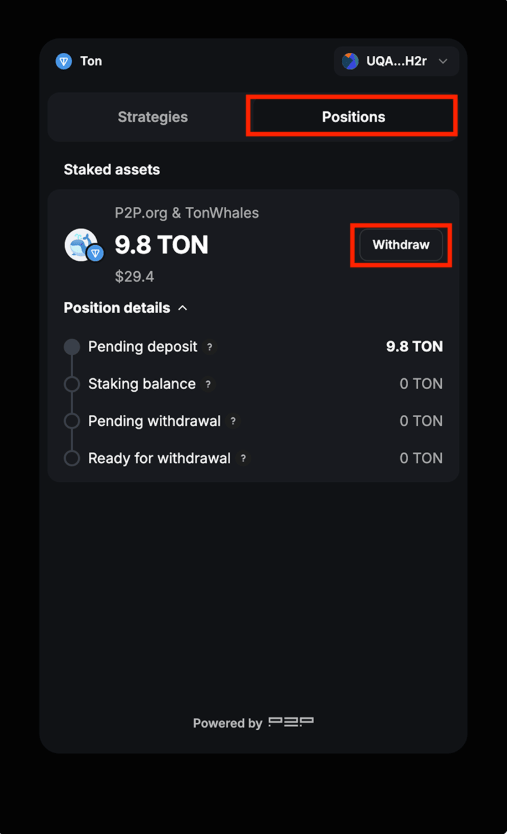 4. To withdraw, click **Withdraw**, confirm the action, and validate on your device.
This documentation is built and hosted on [Mintlify](https://mintlify.com), a developer documentation platform.
4. To withdraw, click **Withdraw**, confirm the action, and validate on your device.
This documentation is built and hosted on [Mintlify](https://mintlify.com), a developer documentation platform.