> ## Documentation Index
> Fetch the complete documentation index at: https://whalescorp.mintlify.site/llms.txt
> Use this file to discover all available pages before exploring further.
# Adding/removing a card from Apple Pay
## Adding a Card via In-app Provisioning
Using this interface is only possible if the application in which it is implemented has passed Apple certification.
1. When creating a new card or navigating to a previously issued card, a button for adding the card to Apple Pay is displayed to the user.
-1.PNG?fit=max&auto=format&n=KzAAWyvWL5SHyBrh&q=85&s=371e59bf26c873823cacef5719b7d5c7 "IMG 0609(1) 1") 2. When the button is pressed, the Apple interface opens with brief card data. The user clicks continue.
2. When the button is pressed, the Apple interface opens with brief card data. The user clicks continue.
 3. The user accepts Apple's policies.
4. The user can make the card the default payment method in the wallet or return to the application.
3. The user accepts Apple's policies.
4. The user can make the card the default payment method in the wallet or return to the application.
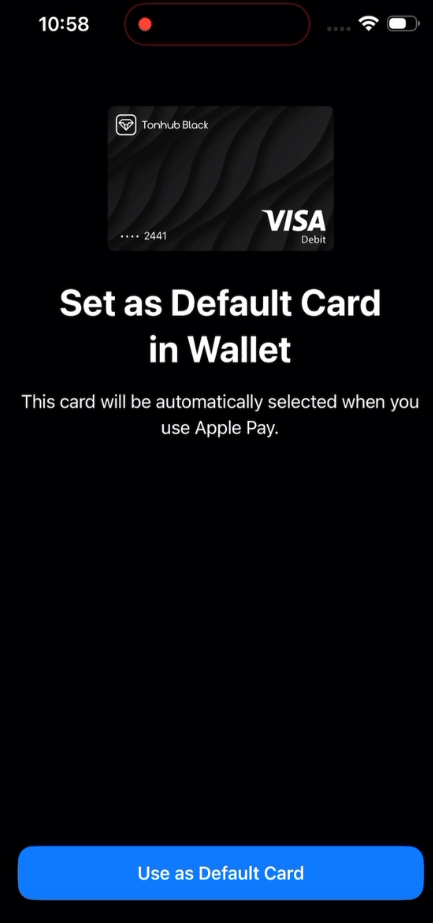 5. The user verifies the card in Apple Wallet.
6. The Apple Pay add button disappears for the added card.
## Adding a Card to Apple Pay Manually
A payment card can be added to [Apple Pay](https://www.apple.com/apple-pay/)/[Apple Wallet](https://apps.apple.com/us/app/apple-wallet/id1160481993) regardless of whether the application in which it is issued has passed Apple certification. It is sufficient for the issuing bank to have passed the appropriate certification.\
**Card addition procedure:**
1. The user opens the [Apple Wallet](https://apps.apple.com/us/app/apple-wallet/id1160481993) application
5. The user verifies the card in Apple Wallet.
6. The Apple Pay add button disappears for the added card.
## Adding a Card to Apple Pay Manually
A payment card can be added to [Apple Pay](https://www.apple.com/apple-pay/)/[Apple Wallet](https://apps.apple.com/us/app/apple-wallet/id1160481993) regardless of whether the application in which it is issued has passed Apple certification. It is sufficient for the issuing bank to have passed the appropriate certification.\
**Card addition procedure:**
1. The user opens the [Apple Wallet](https://apps.apple.com/us/app/apple-wallet/id1160481993) application
.PNG?fit=max&auto=format&n=KzAAWyvWL5SHyBrh&q=85&s=09bcff0d4d1a2f570d07987817941fef "IMG 0609(1)") 2. The user selects the "Debit or Credit Card" option
3. The user enters card data using one of the methods:
1. Automatic reading via [NFC](https://support.apple.com/ru-ru/102221)
2. Manual data entry
2. The user selects the "Debit or Credit Card" option
3. The user enters card data using one of the methods:
1. Automatic reading via [NFC](https://support.apple.com/ru-ru/102221)
2. Manual data entry
.PNG?fit=max&auto=format&n=KzAAWyvWL5SHyBrh&q=85&s=405550880f165942d3922094f0d6bc54 "IMG 0616(1)") 4. The user accepts the [Terms and Conditions](https://www.apple.com/legal/privacy/)
5. If necessary, the user goes through the card verification procedure. \
To verify the card, the user can contact Holders support.
4. The user accepts the [Terms and Conditions](https://www.apple.com/legal/privacy/)
5. If necessary, the user goes through the card verification procedure. \
To verify the card, the user can contact Holders support.
.PNG?fit=max&auto=format&n=KzAAWyvWL5SHyBrh&q=85&s=c2c9929dcf2e71fcc89fe5f7fb913e2e "IMG 0617(1)") ## Removing a Card from Apple Pay
Payment cards in Apple Pay can be added and removed at the user's discretion. When a card is removed from Apple Wallet, the ability to use it for contactless payments is lost. The card removal procedure is performed through the card management menu, located in the upper right corner of the application screen. It is important to note that removing a card from Apple Pay does not affect the processing of refund payments that arrive after its removal, since the issuing bank processes these transactions using the original payment card details.
This documentation is built and hosted on [Mintlify](https://mintlify.com), a developer documentation platform.
## Removing a Card from Apple Pay
Payment cards in Apple Pay can be added and removed at the user's discretion. When a card is removed from Apple Wallet, the ability to use it for contactless payments is lost. The card removal procedure is performed through the card management menu, located in the upper right corner of the application screen. It is important to note that removing a card from Apple Pay does not affect the processing of refund payments that arrive after its removal, since the issuing bank processes these transactions using the original payment card details.
This documentation is built and hosted on [Mintlify](https://mintlify.com), a developer documentation platform.